
ZestyTS's UWUVCI V3 – Ultimate Wii U Virtual Console Injector
A downloadable tool for Windows and macOS
This is ZestyTS's changes to the UWUVCI-V3 project, it is no longer the official version.
What This Tool Does
UWUVCI V3 takes your legally-owned game backups and builds installable Wii U titles using the proper base files, icons, banners, images, and system-specific settings.
The tool handles:
-
Preparing base files
-
Extracting and rebuilding ISOs
-
Applying patches (GCT, video modes, DOL edits)
-
Managing images and converting them to the correct TGA formats
-
Creating NFS files
-
Auto-placing TMD/TIK files for Wii and GCN injects
If you’ve used previous versions of UWUVCI, this update aims to smooth out the rough parts and reduce the random failures that used to happen.
Supported Systems
Retro VC Types
-
Nintendo DS
-
Game Boy Advance (GB/GBC)
-
Nintendo 64
-
SNES
-
NES
-
TurboGrafx-16
-
MSX
Full System Injects
-
Wii
-
ISO, WBFS, NKIT, and DOL (homebrew)
-
Optional video patching
-
GCT insertion
-
TMD/TIK extraction and replacement
-
Automatic NFS generation
-
-
GameCube
-
Fully integrated Nintendont
-
Disc 1 / Disc 2 support
-
Aspect and video mode options
-
Updated TMD/TIK handling
Support & Feedback
If something breaks or behaves differently than expected, feel free to report it so it can be improved in the next update.
Legal
UWUVCI does not include or distribute any copyrighted game files.
You must supply your own legally obtained game backups.
Purchase
In order to download this tool you must purchase it at or above the minimum price of $2.99 USD. You will get access to the following files:
Development log
- V3.201.213 days ago
- "Modern" Mac App Temporarily Removed16 days ago
- V3.201.1 / Mac & Linux Update24 days ago
- V3.20130 days ago
- V3.200.777 days ago
- V3.200.679 days ago
- V3.200.580 days ago
- V3.200.480 days ago

Comments
Log in with itch.io to leave a comment.
MacOS version is practically useless. Every time trying to download the base for Rhythm Heaven Fever seems to go somewhere and then just disappears and the text remains red never actually finishing the download.
I have given the app all access to everything it asked me to and also checked in settings for anything needing my attention.
Bought this tool yesterday
I can't see to get the Classic Controller input on the gamepad working. Tried both regular Classic Controller setting and Forced, 2 different bases for the inject (Rhythm Heaven Fever and Xenoblade)
Game is Sonic Unleashed, which the compatibility wiki says it supports it and is playable on the Gamepad
Only settings I changed besides the controller setting was for disabling dithering and abother setting to make the graphics look sharper
Any support?
When you say "working," do you mean that it flat out doesn't do anything, or do you mean the controls act funny? Most people complain that Sonic Unleashed doesn't have proper controls when they use GamePad.
The game works fine but 0 input from the Game Pad
Just wanted to make sure it's just this game with this issue and that I'm not patching it incorrectly (still new to it)
Did you select the option for Classic Controller in Sonic Unleashed like in the game's settings?
I did yes, no luck from that either
I also went ahead and tried out Fortune Street and that game also gets zero input from the gamepad controller despite me setting the settings to make the Gamepad Emulate a Horizontal Wii Remote
These were the settings I used for Fortune Street (settings are pretty much the same for Unleashed minus the controls being Classic Controller and the base being Xenobloade and having a GCT file added)
https://imgur.com/a/NRVQPCV
Hello, I'm one of the buyers of your software and I want to say one of the solutions I found for using your software on Mac with Apple Silicon is installing the Windows version with Porting Kit. I hope you'll be able to resolve all your issues with the Mac port, but for now, this is a guaranteed way for the app to work on various Macs.
So, that's essentially how the Mac versions are, they are being wrapped using wineskin which is the same thing that Porting Kit seems to do. If you click into the Mac version of UWUVCI enough, you'll see that it's running a ".exe" file. Being on Apple Silicon isn't the problem it's macOS 26 that's the problem. I only have one mac that can get to 26 (it's an M2) so it's challenging to figure out what worked and didn't work when I'm testing on the same machine that built it. But, if you'd like to assist in helping me figure out what's the issue with the Modern app on macOS 26, if you right click the app itself and click "show package contents" or something like that then click into the "Contents" directory, and into the "Logs" directory. If you could email those to ZestyTS@gmail.com that would be greatly appreciated.
Hello. I'm having a similar issue to the other Mac users. Running the command hasn't helped and I've tried both the Legacy and Modern versions. Both refuse to launch the app even after I clear it in the Privacy and Security settings. I'm using an M4 Mac mini if that helps.
Update: The windows version won’t install on my PC either because it’s being blocked as a virus. I’ve never had that issue before.
Well, you're the first mac user to have a problem with the Modern version. Can you do me two things, one tell me what OS version you're on, and two give me a log file. If you right click the app itself and click "show package contents" or something like that then click into the "Contents" directory, and into the "Logs" directory. There should be a file there, can you paste it into this so I can check it out.
Thank you for the reply! So I got it to launch eventually by opening it after I placed it in the Applications folder but now I have another big problem. Every time I try to select a Rom Path the app crashes. Also there are two logs in the folder, LastRunWine and Winetricks. Both are too long for me to paste here. Which one should I open and how much should I copy and paste?
Hmmm, I don't know because those are only based on last start up, so email both of them to ZestyTS@gmail.com. In addition, in UWUVCI, click the gear icon at the top right, then the button "AppSettings" and then the "Open Log Folder." Send all of those files to me as well so I can see what you're running into.
I sent the logs to your email. Hope it helps.
The logs did help a bit. It looks like the issue stems from me having to use a different Wine engine for macOS 26 support. I made an update today that should fix it. Check it out and let me know if you have any issues.
Hi I am having a similar issue as the other mac users (I am using macbook pro M2) but i dont think it has been resolved? I have the app in my applications file, and I ran the command line. I also installed rosetta, but now when I try to open the app, nothing happens (whereas before doing the first steps i mentioned, it would say that it was damaged).
Is there something else I am missing? Do you need me to send you anything to help troublehsoot? Thanks again!
I'm unsure if they have been solved or not since most people don't reply. If you haven't tried restarting, I would say do that now to make sure there isn't anything running in the background. Most people get the "app is damaged" error when they try to run it directly out of the dmg file. It sounds like you are doing everything correctly though since the steps are
1) Drag app to Applications folder
2) Run Fix-Quaratine.command
3) Run UWUVCI-V3 out of Applications folder.
It would help if I could get a log file, but I don't know where one would get stored, and I've tested this on a Mac as early as 2011 to an M2 and ran into no issues. I can see that most people on Mac aren't running into issues, so I'm wondering what makes the few of you that have posted here different. I know one person had an issue and it's because they had Android Studio installed which was somehow messing with what they had. But like I said, it's really hard for me to understand what the issue you could be having is.
Hey thanks for getting back to me!
I used chatgpt to see where I can get something like a log file or crash report, and it told me to go to utilities > console and look for something like wine. Below is the crash report (in a separate reply) but this is what chatgpt called out; perhaps it is because I am using OS 26.2 and this does not support it?
Let me know if this helps!
🔥 What the crash log is saying (plain English)
This is the key line:
That means:
macOS’s loader (dyld) refuses to start Wine
The Wine binary inside UWUVCI is too old / incorrectly linked
Newer macOS versions no longer allow this binary to launch at all
This is a hard stop at launch, not a Java issue, not permissions, not quarantine.
🧠 Why this happens specifically on your Mac
Important clues from the log:
macOS 26.2
Apple Silicon (
Translated: true, Rosetta)Wine 9.0 (Kegworks wrapper)
What changed:
New macOS versions tightened Mach-O validation
Wine binaries that don’t explicitly link
libSystem.dylibare now rejectedKegworks/CrossOver Wine used by UWUVCI v3 has not been updated
So macOS kills it before UWUVCI even starts. That’s why:
App icon bounces (or doesn’t)
No UWUVCI logs appear
Only Wine crashes
❌ Things that will NOT fix this (don’t waste time)
Just so you don’t go in circles:
❌ Reinstalling Java
❌ Removing quarantine
❌ Re-downloading UWUVCI
❌ Running in Rosetta manually
❌ Disabling SIP (also not recommended)
This is a binary incompatibility, not configuration.
-------------------------------------
Translated Report (Full Report Below)
-------------------------------------
Process: wine [1922]
Path: /private/var/folders/*/wine
Identifier: wine
Version: 9.0 (9.0)
Code Type: X86-64 (Translated)
Role: Unspecified
Parent Process: launchd [1]
Coalition: com.kegworks.UWUVCIV3964334181 [1508]
Responsible Process: Kegworks [1868]
User ID: 501
Date/Time: 2026-02-02 22:25:58.0169 -0500
Launch Time: 2026-02-02 22:25:57.9910 -0500
Hardware Model: Mac14,9
OS Version: macOS 26.2 (25C56)
Release Type: User
Crash Reporter Key: 02B38AD1-1AFE-36F2-6A7E-62BA0CA7426B
Incident Identifier: EB656F1C-0BA0-4846-8251-3DC718BCDC79
Time Awake Since Boot: 200 seconds
System Integrity Protection: enabled
Triggered by Thread: 0
Exception Type: EXC_CRASH (SIGABRT)
Exception Codes: 0x0000000000000000, 0x0000000000000000
Termination Reason: Namespace DYLD, Code 0,
missing LC_LOAD_DYLIB (must link with at least libSystem.dylib)
Thread 0 Crashed:
0 ??? 0x30020fb80 ???
1 ??? 0x3001d1464 ???
2 dyld 0x300093037 abort_with_payload_wrapper_internal + 82
3 dyld 0x300093069 abort_with_payload + 9
4 dyld 0x300017247 dyld4::halt(char const*, dyld4::StructuredError const*) + 343
5 dyld 0x300013b63 dyld4::prepare(dyld4::APIs&, mach_o::Header const*) + 4525
6 dyld 0x30001272d start + 3373
Thread 1:: com.apple.rosetta.exceptionserver
Thread 0 crashed with X86 Thread State (64-bit):
rax: 0x0000000000000006 rbx: 0x0000000000000014 rcx: 0x0000000000000000 rdx: 0x0000000404128d50
rdi: 0x0000002004128930 rsi: 0x88867da98c9b00bb rbp: 0x0000000000000000 rsp: 0x0000000404128950
r8: 0x0000000404128950 r9: 0x0000000000000000 r10: 0x0000000000000014 r11: 0x0000000404128950
r12: 0x0000000000000000 r13: 0x0000000404128d50 r14: 0x0000000000000006 r15: 0x0000000000000014
rip: <unavailable> rfl: 0x0000000000000283
tmp0: 0xffffffffffffffff tmp1: 0x000000030020fb54 tmp2: 0x0000000300093037
Binary Images:
0x30000c000 - 0x3000a9fff dyld (*) <759d71bc-86dc-3d9c-a062-86fc312218ea> /usr/lib/dyld
0x200000000 - 0x200002fff wine (*) <10bcd3a2-e1d0-3b3f-9f44-ba733823f8f8> /var/folders/*/wine
0x0 - 0xffffffffffffffff ??? (*) <00000000-0000-0000-0000-000000000000> ???
External Modification Summary:
Calls made by other processes targeting this process:
task_for_pid: 0
thread_create: 0
thread_set_state: 0
Calls made by this process:
task_for_pid: 0
thread_create: 0
thread_set_state: 0
Calls made by all processes on this machine:
task_for_pid: 0
thread_create: 0
thread_set_state: 0
VM Region Summary:
ReadOnly portion of Libraries: Total=992K resident=0K(0%) swapped_out_or_unallocated=992K(100%)
Writable regions: Total=8.2G written=320K(0%) resident=320K(0%) swapped_out=0K(0%) unallocated=8.2G(100%)
VIRTUAL REGION
REGION TYPE SIZE COUNT (non-coalesced)
=========== ======= =======
Rosetta Arena 4096K 2
Rosetta Generic 1028K 254
Rosetta IndirectBranch 32K 1
Rosetta JIT 128.0M 1
Rosetta Return Stack 20K 2
Rosetta Thread Context 20K 2
Stack 8176K 1
Stack Guard 56.0M 1
VM_ALLOCATE 48K 1
VM_ALLOCATE (reserved) 24K 3 reserved VM address space (unallocated)
WINE_RESERVE 8.0G 1
__DATA 140K 3
__DATA_CONST 28K 1
__DATA_DIRTY 16K 2
__LINKEDIT 368K 4
__TEXT 644K 2
dyld private memory 4K 1
mapped file 2012K 10
page table in kernel 320K 1
=========== ======= =======
TOTAL 8.2G 293
TOTAL, minus reserved VM space 8.2G 293
Error Formulating Crash Report:
RIP register does not match crashing frame (0x0 vs 0x30020FB80)
-----------
Full Report
-----------
{"app_name":"wine","timestamp":"2026-02-02 22:25:58.00 -0500","app_version":"9.0","slice_uuid":"10bcd3a2-e1d0-3b3f-9f44-ba733823f8f8","build_version":"9.0","platform":1,"share_with_app_devs":0,"is_first_party":1,"bug_type":"309","os_version":"macOS 26.2 (25C56)","roots_installed":0,"incident_id":"EB656F1C-0BA0-4846-8251-3DC718BCDC79","name":"wine"}
{
"uptime" : 200,
"procRole" : "Unspecified",
"version" : 2,
"userID" : 501,
"deployVersion" : 210,
"modelCode" : "Mac14,9",
"coalitionID" : 1508,
"osVersion" : {
"train" : "macOS 26.2",
"build" : "25C56",
"releaseType" : "User"
},
"captureTime" : "2026-02-02 22:25:58.0169 -0500",
"codeSigningMonitor" : 2,
"incident" : "EB656F1C-0BA0-4846-8251-3DC718BCDC79",
"pid" : 1922,
"translated" : true,
"cpuType" : "X86-64",
"procLaunch" : "2026-02-02 22:25:57.9910 -0500",
"procStartAbsTime" : 4960954457,
"procExitAbsTime" : 4961571261,
"procName" : "wine",
"procPath" : "\/private\/var\/folders\/*\/wine",
"bundleInfo" : {"CFBundleVersion":"9.0","CFBundleShortVersionString":"9.0"},
"parentProc" : "launchd",
"parentPid" : 1,
"coalitionName" : "com.kegworks.UWUVCIV3964334181",
"crashReporterKey" : "02B38AD1-1AFE-36F2-6A7E-62BA0CA7426B",
"appleIntelligenceStatus" : {"state":"available"},
"developerMode" : 1,
"responsiblePid" : 1868,
"responsibleProc" : "Kegworks",
"codeSigningID" : "com.codeweavers.CrossOver.wineloader",
"codeSigningTeamID" : "",
"codeSigningFlags" : 570425345,
"codeSigningValidationCategory" : 10,
"codeSigningTrustLevel" : 4294967295,
"codeSigningAuxiliaryInfo" : 0,
"bootSessionUUID" : "4CC2209C-FC6E-412A-A3C3-F110398F76B8",
"sip" : "enabled",
"exception" : {"codes":"0x0000000000000000, 0x0000000000000000","rawCodes":[0,0],"type":"EXC_CRASH","signal":"SIGABRT"},
"termination" : {"code":0,"flags":518,"namespace":"DYLD","reasons":["missing LC_LOAD_DYLIB (must link with at least libSystem.dylib)"]},
"extMods" : {"caller":{"thread_create":0,"thread_set_state":0,"task_for_pid":0},"system":{"thread_create":0,"thread_set_state":0,"task_for_pid":0},"targeted":{"thread_create":0,"thread_set_state":0,"task_for_pid":0},"warnings":0},
"faultingThread" : 0,
"threads" : [{"triggered":true,"id":19075,"threadState":{"flavor":"x86_THREAD_STATE","rbp":{"value":0},"r12":{"value":0},"rosetta":{"tmp2":{"value":12885504055},"tmp1":{"value":12887063380},"tmp0":{"value":18446744073709551615}},"rbx":{"value":20},"r8":{"value":17248192848},"r15":{"value":20},"r10":{"value":20},"rdx":{"value":17248193872},"rdi":{"value":137507277104},"r9":{"value":0},"r13":{"value":17248193872},"rflags":{"value":643},"rax":{"value":6},"rsp":{"value":17248192848},"r11":{"value":17248192848},"rcx":{"value":0},"r14":{"value":6},"rsi":{"value":9837688603199340731}},"frames":[{"imageOffset":12887063424,"imageIndex":2},{"imageOffset":12886807652,"imageIndex":2},{"imageOffset":553015,"symbol":"abort_with_payload_wrapper_internal","symbolLocation":82,"imageIndex":0},{"imageOffset":553065,"symbol":"abort_with_payload","symbolLocation":9,"imageIndex":0},{"imageOffset":45639,"symbol":"dyld4::halt(char const*, dyld4::StructuredError const*)","symbolLocation":343,"imageIndex":0},{"imageOffset":31587,"symbol":"dyld4::prepare(dyld4::APIs&, mach_o::Header const*)","symbolLocation":4525,"imageIndex":0},{"imageOffset":26413,"symbol":"start","symbolLocation":3373,"imageIndex":0}]},{"id":19076,"name":"com.apple.rosetta.exceptionserver","threadState":{"flavor":"x86_THREAD_STATE","rbp":{"value":34097745362944},"r12":{"value":0},"rosetta":{"tmp2":{"value":0},"tmp1":{"value":0},"tmp0":{"value":0}},"rbx":{"value":0},"r8":{"value":7939,"symbolLocation":3843,"region":"Rosetta Runtime Routines"},"r15":{"value":0},"r10":{"value":0},"rdx":{"value":0},"rdi":{"value":0},"r9":{"value":1},"r13":{"value":0},"rflags":{"value":515},"rax":{"value":268451845,"symbolLocation":268447749,"region":"Rosetta Runtime Routines"},"rsp":{"value":0},"r11":{"value":0},"rcx":{"value":17314086914},"r14":{"value":0},"rsi":{"value":2616}},"frames":[]}],
"usedImages" : [
{
"source" : "P",
"arch" : "x86_64",
"base" : 12884951040,
"size" : 647168,
"uuid" : "759d71bc-86dc-3d9c-a062-86fc312218ea",
"path" : "\/usr\/lib\/dyld",
"name" : "dyld"
},
{
"source" : "P",
"arch" : "x86_64",
"base" : 8589934592,
"size" : 12288,
"uuid" : "10bcd3a2-e1d0-3b3f-9f44-ba733823f8f8",
"path" : "\/var\/folders\/*\/wine",
"name" : "wine"
},
{
"size" : 0,
"source" : "A",
"base" : 0,
"uuid" : "00000000-0000-0000-0000-000000000000"
}
],
"sharedCache" : {
"base" : 140703313297408,
"size" : 30064771072,
"uuid" : "068332b5-70dd-387c-9d28-14df021f716f"
},
"vmSummary" : "ReadOnly portion of Libraries: Total=992K resident=0K(0%) swapped_out_or_unallocated=992K(100%)\nWritable regions: Total=8.2G written=320K(0%) resident=320K(0%) swapped_out=0K(0%) unallocated=8.2G(100%)\n\n VIRTUAL REGION \nREGION TYPE SIZE COUNT (non-coalesced) \n=========== ======= ======= \nRosetta Arena 4096K 2 \nRosetta Generic 1028K 254 \nRosetta IndirectBranch 32K 1 \nRosetta JIT 128.0M 1 \nRosetta Return Stack 20K 2 \nRosetta Thread Context 20K 2 \nStack 8176K 1 \nStack Guard 56.0M 1 \nVM_ALLOCATE 48K 1 \nVM_ALLOCATE (reserved) 24K 3 reserved VM address space (unallocated)\nWINE_RESERVE 8.0G 1 \n__DATA 140K 3 \n__DATA_CONST 28K 1 \n__DATA_DIRTY 16K 2 \n__LINKEDIT 368K 4 \n__TEXT 644K 2 \ndyld private memory 4K 1 \nmapped file 2012K 10 \npage table in kernel 320K 1 \n=========== ======= ======= \nTOTAL 8.2G 293 \nTOTAL, minus reserved VM space 8.2G 293 \n",
"legacyInfo" : {
"threadTriggered" : {
}
},
"logWritingSignature" : "3de850a1d2ef97f0e1592473647488fcd2f28312",
"bug_type" : "309",
"roots_installed" : 0,
"trmStatus" : 1,
"reportNotes" : [
"RIP register does not match crashing frame (0x0 vs 0x30020FB80)"
]
}
Hey, I appreciate the log, I'm seeing exactly what the error is, not entirely sure how to resolve it at this moment in time (I only found one of my macs after all the crap recently), so I'll boot it up and see if I'm able to replicate the problem. Thanks!
Thank you! Let me know what you find when you have the chance, and if you need anything else from me.
Hi this message show whne i hit inject button.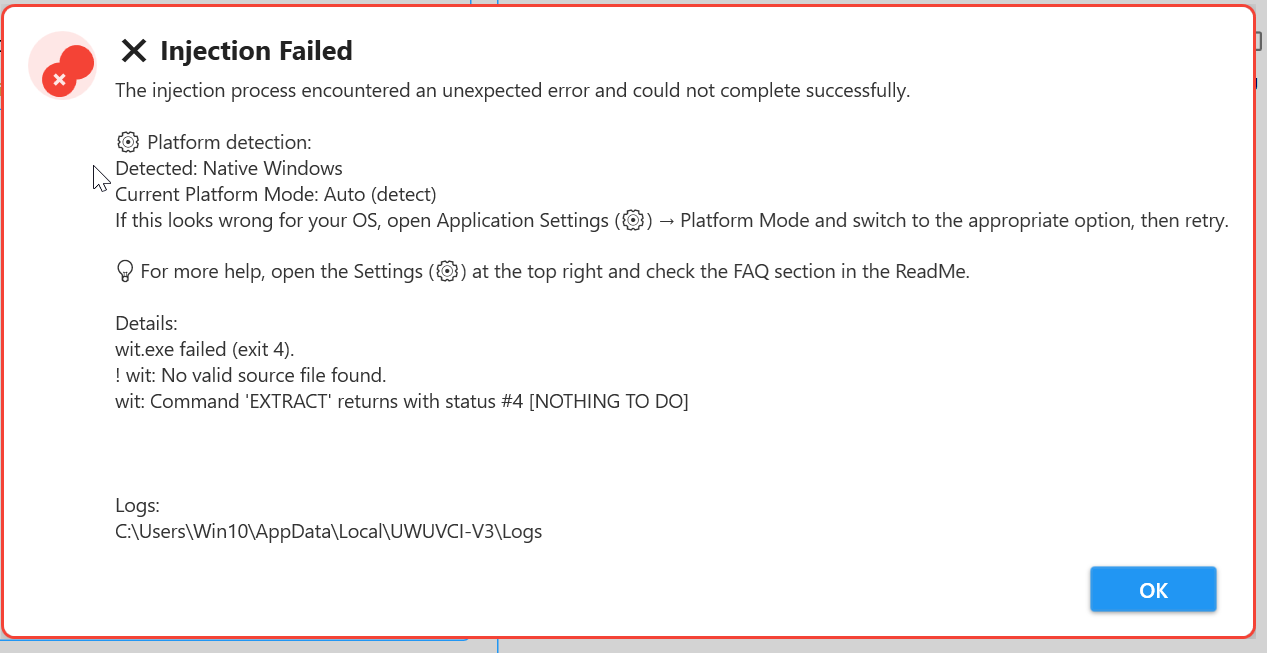
Yeah, that means you have a heavily modified rom, aka instead of using your own backup you got the game from either a site that begins with a V or an M.
Hello,
when i try to open the App in my application folder, nothing happens. I am on a MacBook M1.
When i try to run the Fix file this happens:
xattr: [Errno 1] Operation not permitted: '/Applications/UWUVCI-V3.app/Contents/SharedSupport/prefix/dosdevices/z:'
xattr: [Errno 1] Operation not permitted: '/Applications/UWUVCI-V3.app/Contents/SharedSupport/prefix/dosdevices/e::'
xattr: No such file: /Applications/UWUVCI-V3.app/Contents/SharedSupport/prefix/dosdevices/f:
xattr: No such file: /Applications/UWUVCI-V3.app/Contents/SharedSupport/prefix/dosdevices/e:
xattr: [Errno 13] Permission denied: '/Applications/UWUVCI-V3.app/Contents/SharedSupport/prefix/dosdevices/f::'
xattr: [Errno 1] Operation not permitted: '/Applications/UWUVCI-V3.app/Contents/SharedSupport/prefix/dosdevices/h::'
xattr: No such file: /Applications/UWUVCI-V3.app/Contents/SharedSupport/prefix/dosdevices/d:
xattr: [Errno 13] Permission denied: '/Applications/UWUVCI-V3.app/Contents/SharedSupport/prefix/dosdevices/g::'
xattr: No such file: /Applications/UWUVCI-V3.app/Contents/SharedSupport/prefix/dosdevices/g:
xattr: [Errno 1] Operation not permitted: '/Applications/UWUVCI-V3.app/Contents/SharedSupport/prefix/dosdevices/i::'
xattr: No such file: /Applications/UWUVCI-V3.app/Contents/SharedSupport/prefix/dosdevices/j:
xattr: [Errno 1] Operation not permitted: '/Applications/UWUVCI-V3.app/Contents/SharedSupport/prefix/dosdevices/d::'
xattr: No such file: /Applications/UWUVCI-V3.app/Contents/SharedSupport/prefix/dosdevices/j::
Quarantine cleared for /Applications/UWUVCI-V3.app
Press any key to close.
Any idea? Thank you
That's exactly what it should say when you run the file fix. if you don't run the file fix it will tell you that the program is blocked by Apple. I don't have time at this second in time to write everything to try, but someone else asked the exact same thing, can you look over that post to see if there's anything that can help you?
The V3.200.6 won't start on my M3 MacBook Pro. I used the terminal command for quarantine fix so the error message disappeared, but now, nothing happened when I start the app. And I wait for more than just a few minutes...
Is it running in your activities? Or whatever the app is called that shows your running processes? And, only because this has come up numerous times already, you're running the app out of your Applications and not out of the mounted DMG?
I can see the app in die activity manager only a few seconds. After then it disappears. Of course I pushed the app in die app folder. When I try to start the app out of the DMG, I got the "damaged" message. But starting the app out of die application folder, it does nothing.
I gave it a new try now. I deleted the app, pushed it a new time in die app folder und it started with the "damaged" app. Then I run the script and after completing the script I started the app again. It's the same behavior as mentioned above.
You're the first person to have an issue with it, so I'm unsure of what the issue could be. I'm still going through things as I mentioned in my latest devlog, but let's try to see if there is a log file. If you go to the app and right click it then click "show package contents" there should a few folders, and this is where I forgot the rest of the folders. I know you want to find a prefix folder, then a drive_c folder, and then you would navigate to Users, crossover, appdata, UWUVCI-V3, Logs. If you can see if there is a file there maybe it might tell me what issue you're having exactly.
I have the very same problem
Gotcha, well can you do what I said to the last guy so I can see what the issue is exactly.
Unfortunately, there is no UWUVCI-V3-Folder on this path. I can navigate to appdata like your description, but in appdate there are only Local, LocalLow and Roaming. However, even in this folders there nothing as mentioned above. The Shortcut log Folder in the package is also empty. I'm sorry about the confusion, but I have no idea what is going on here.
I wrote this reply a month ago and forgot to send it. Just wondering why I don't get a reply fm you, I am sorry.
It would have yelled at you if you didn't have enough space. There is a log file that should have all of the info needed. If you can give it to me, I should be able to see what the issue is. You can also give it to an AI because it might be able to help you.
Did you by chance install this in the same folder as an old folder of UWUVCI? The error message doesn't make sense. So, completely uninstall UWUVCI, and then install it again and see if that fixes the issue.
im not sure what im doing wrong. im using V3.200.6 and when i download the gamecube inject it shows as a corrupted file. my nintendont and everything works fine so im not sure why its not working. Ive tried multiple games so its not a one time issue, it happened to all the games ive tried.
Yeah, there are two different bugs that people run into, if one gets fixed the other one creeps up. There's a new version that should fix that issue, also please read through the devlog for V3.200.7.
Charging for something meant to meander around piracy realities is kiiiinda capitalist. Either make the tool or don't, don't paywall something because you're greedy.
Coding is thankless. Be Godly Glad you touch the cosmos of 'not you', and that everyone's lives are better because of you. Saying that as a thankless creator as well.
Paying the $3. Not gonna fix my issue i'm having with my wii romhack. But still, out of goodwill paying that You might understand this is not a troll. You should understand what you're doing. Slippery slope that's been coated with wax for years, and you're taking on potentially the brunt of a billion-dollar company if it gets out. Sure no code owned by them, but my God they care you're charging for the ability to 'do as such'. And that's what itchio is. Charging for the code.
Trust me. Stop charging, take the donations bro.
Two things, first one I'm not the creator, just some guy. Second thing, the donations were very few and wasn't enough to pay for the some of the things like the website and compatibility submission. I tried before asking for people to buy my game to offset costs, but that didn't happen either. The decision to make this paid is because of the lack of community support and donations. Itch.io isn't charging for the code, it's charging for an executable I made. The code is out in the open and has been, and since it took donations before it becomes open for Nintendo to come down on.
I want to apologize to you. Did not know the situation, and yknow three bucks is nothing, because hilariously enough that new version (when i made enough room on my cramped laptop) did actually work when Literally nothing else did, and I spent easily 20+hrs testing and building and failing the same thing over and over.
So I'll donate ten bucks, least I can do given the situation now.
Thanks for coming around. For the 3.200 release, I wanted to make sure to fix any but that people came across, and to add every new feature/enhancement that I could think of. I still want to create a Linux version just like how there is a Mac version. I did this because I wanted people to feel like that this version would be worth it.