NEODRIVE
How To Make Car Sound
I was able to create all the car engine noises in this game with free tools. Buckle up though, because it was a decent amount of work.
Overview
- Generate engine noises in steps of 1000 RPM
- Pick which one to play, and play it pitched up or down
- Add gearbox noise
- Make it better via code
I’ll get into each step in detail.
Required Software
- Audacity
- EngineSim Community Edition
- LabChirp (optional, for gear noises)
1. Record Engine Sounds
In EngineSim, you can use the Dyno Hold to keep the engine at a specific RPM. Here it is being held at 1500 RPM.
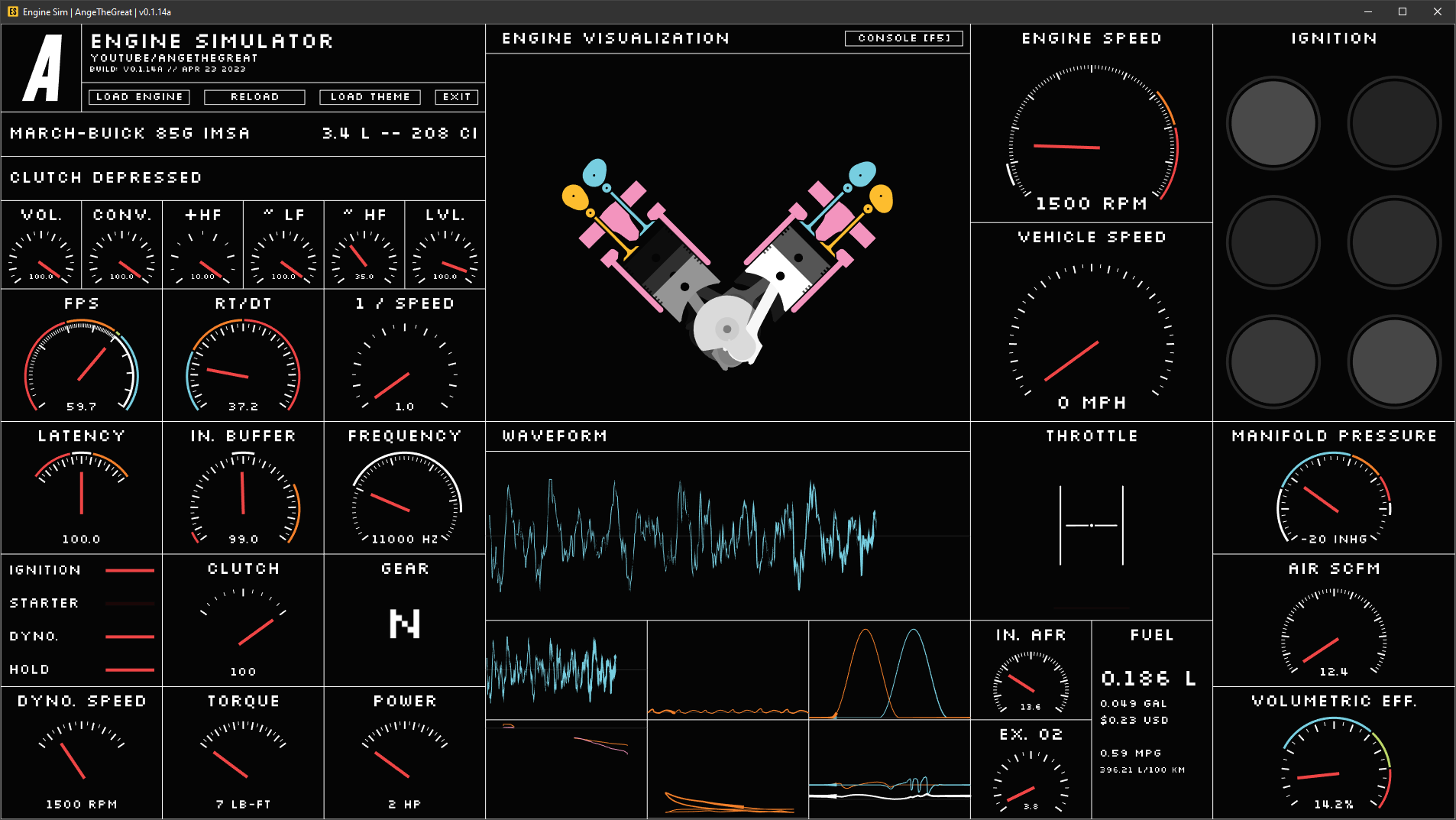
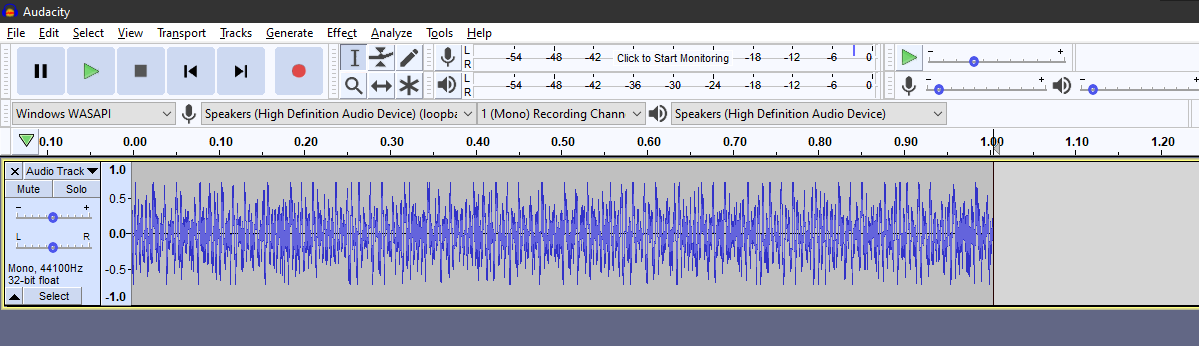
I recorded my computer’s audio with Audacity and got a 1 second clip.
Now, I need to cut this clip at the same time in the combustion cycle. You can zoom in and look at the waveform to see where it looks like it repeats.

Looks like there are similar bits in the waveform at these points - that M pattern with the thick middle. I’ll trim the start and end around those.
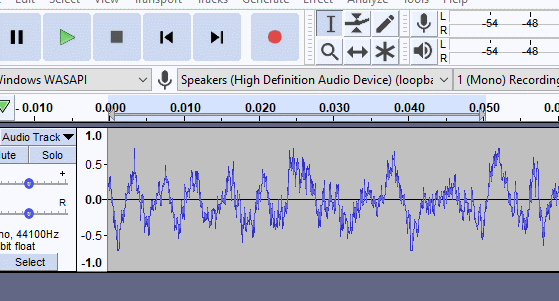
I’m deleting the waveform where it passes through zero. Now, at the start and end, I need to make it fade in and fade out. If you don’t do that, when the sound loops, you’ll hear a little click noise because the ends of the waveform don’t match each other.
Audacity lets you do that by selecting a region and applying it from the menu. I bound it to hotkeys because I’ll be doing it a lot.
Now that I have that sound exported, I gotta name it something like “1500 idle.wav”, because I need another one with gas.
I recorded another clip with the throttle open and cut it the same way.
Then I have to do the same, one idle and one gas clip, for every RPM range up until the engine redline, which is the part that’s a lot of work. I end up with:
- 1500 idle.wav
- 1500 gas.wav
- 2000 idle.wav
- 2000 gas.wav
- 3000 idle.wav
- 3000 gas.wav
- 4000 idle.wav
- 4000 gas.wav
- 5000 idle.wav
- 5000 gas.wav
- 6000 idle.wav
- 6000 gas.wav
- 7000 idle.wav
- 7000 gas.wav
- 8000 idle.wav
- 8000 gas.wav
2. Play Engine Sounds
In Unity, I define a structure like this:
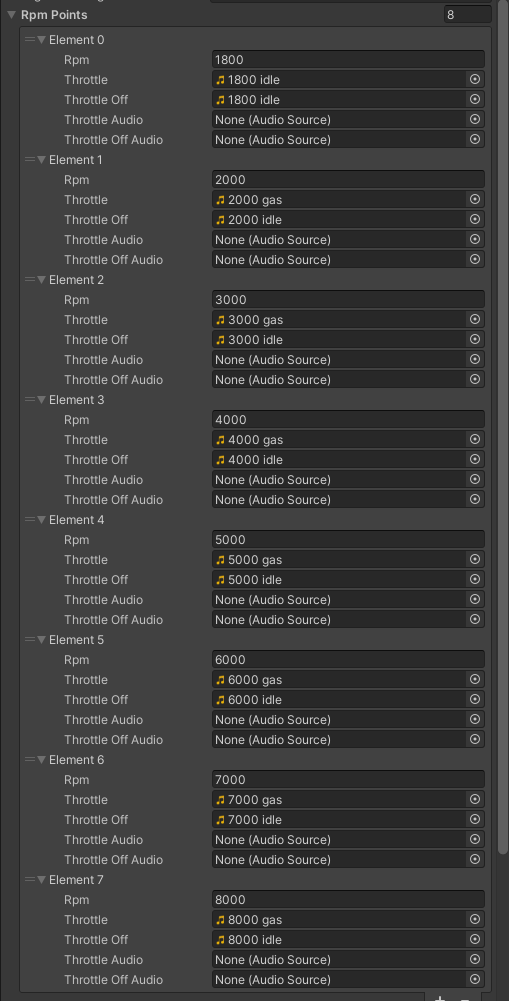
Each RPM point corresponds to two audio clips - throttle off and throttle on.
Sound Blending
The car will never move in steps of 1000 RPM. How do you blend the sounds, then?
In-game, I look at two things:
- the amount of gas given to the car
- the simulated engine RPM
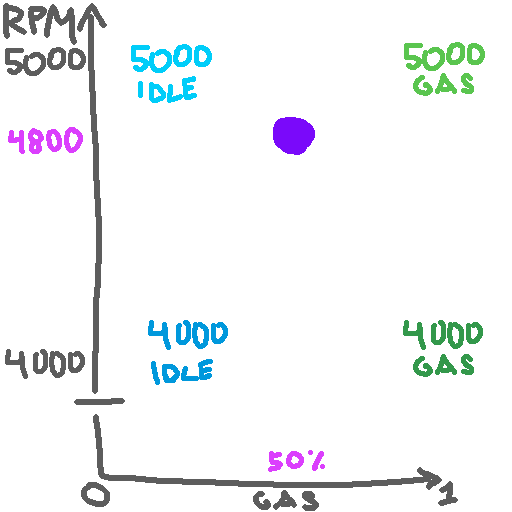
and interpolate between two sounds based on that. For example, say the car’s engine is at 4800 RPM and the player is giving it 50% gas. If you plot RPM and gas in two dimensions, they’re at the purple dot.
Volume
First is volume, that’s easy. 4800 RPM is 80% of the way between 4000 and 5000 RPM. I play the 5000 RPM audio source at 80% volume and the 4000 RPM audio source at 20% volume.
Oh, but wait, there’s also gas. So they have to be interpolated in another axis as well.
Gas is 0.5, so that’s easy. Play each throttle on/off audiosource by their original volume ×50%. So both 5000 RPM ones are being played at 50% × 80% = 40%. The 4000 RPM ones are played at 20% × 50% = 10%.
I could optimize audio by not interpolating based on gas, and only playing the throttle off audio if the gas isn’t pressed. That’s optimization for later.
Pitch
You also need to pitch the sounds up and down. The math is also easy but it took some trial and error.
targetPitch = engineRPM / thresholdRPM
So, the engine RPM is 4800.
- The source is 4000 RPM. 4800 / 4000 = 1.2 so the 4000 RPM audiosources have their pitch set to 1.2.
- The source is 5000 RPM. 4800/5000 = 0.96 so the 5000 RPM audiosources get their pitch set to 0.96.
All together, these are the volumes and pitches for the different sounds.
4000 Idle
- Volume: 0.1
- Pitch: 1.2
4000 Gas
- Volume: 0.2
- Pitch: 1.2
5000 Idle
- Volume: 0.4
- Pitch: 0.96
5000 Gas
- Volume: 0.4
- Pitch: 0.96
Done this way, the audio clips will perfectly blend as the car accelerates and decelerates through the RPMs.
Each threshold is its own playing AudioSource, btw. Changing the clips at runtime will make the sound cut out, so I just enable and disable them to get around audio limits. That happens on the fixed physics timestep.
Gearbox Noise
I spent a while listening to different samples of gearbox noise. They all sound pretty different, but also pretty simple, like a harsh sinewave of some kind. LabChirp to the rescue.
I don’t remember what exactly I did, because I was on a discord call with some car guy friends (thanks, Cam and Jerry) and we just kept trying different things. If you do this, just listen to some examples and play around with whatever sounds good. I think I had a sinewave with some amplitude modulation and a chorus or something.
Gearbox noise is pitched differently than car noise. I just have one clip and pitch it up/down based on wheel speed, not engine RPM. It also gets silent as the car slows down and louder at higher speed.
Polish With Code
I did a few other things when the game is actually playing to make the car sound better.
Driveline Flex
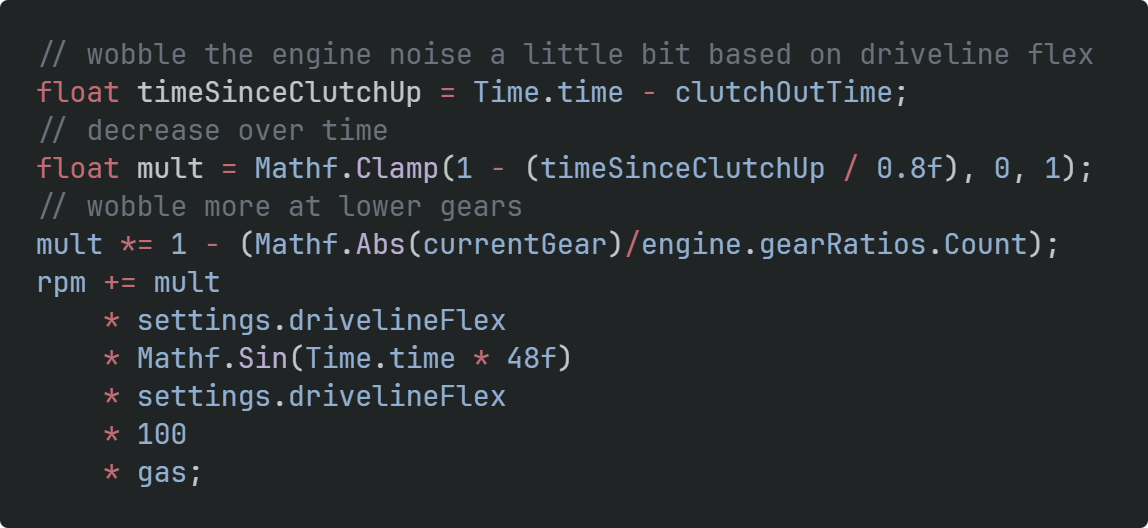
Drivelines in race cars are light to save weight. That means they can twist as the engine suddenly delivers more power to the rear wheels, which makes the engine noise wobble.
When the clutch is let out, I wobble the final engine pitch based on a sinewave with its amplitude multiplied by how much the player is holding the gas. The amplitude quickly decreases.
Gearbox Volume Modulation
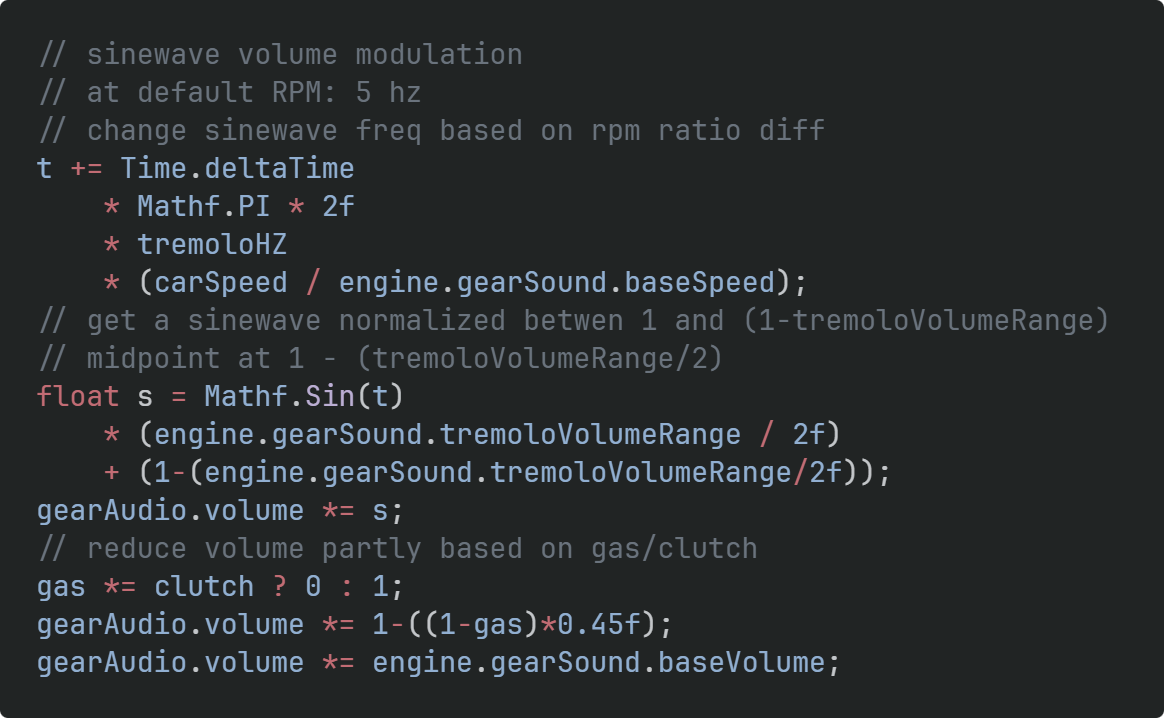
Gear noises aren’t a constant wall of sound. Their volume seems to follow a sine wave based on car speed. So I also make the volume of gearbox noise oscillate based on car speed.
Both of these effects are very subtle, but add a lot.
Other Sound Effects
I also have speed-related playing sounds for:
- wind rushing past the camera
- car tires rolling on the ground
Other Sound Filtering
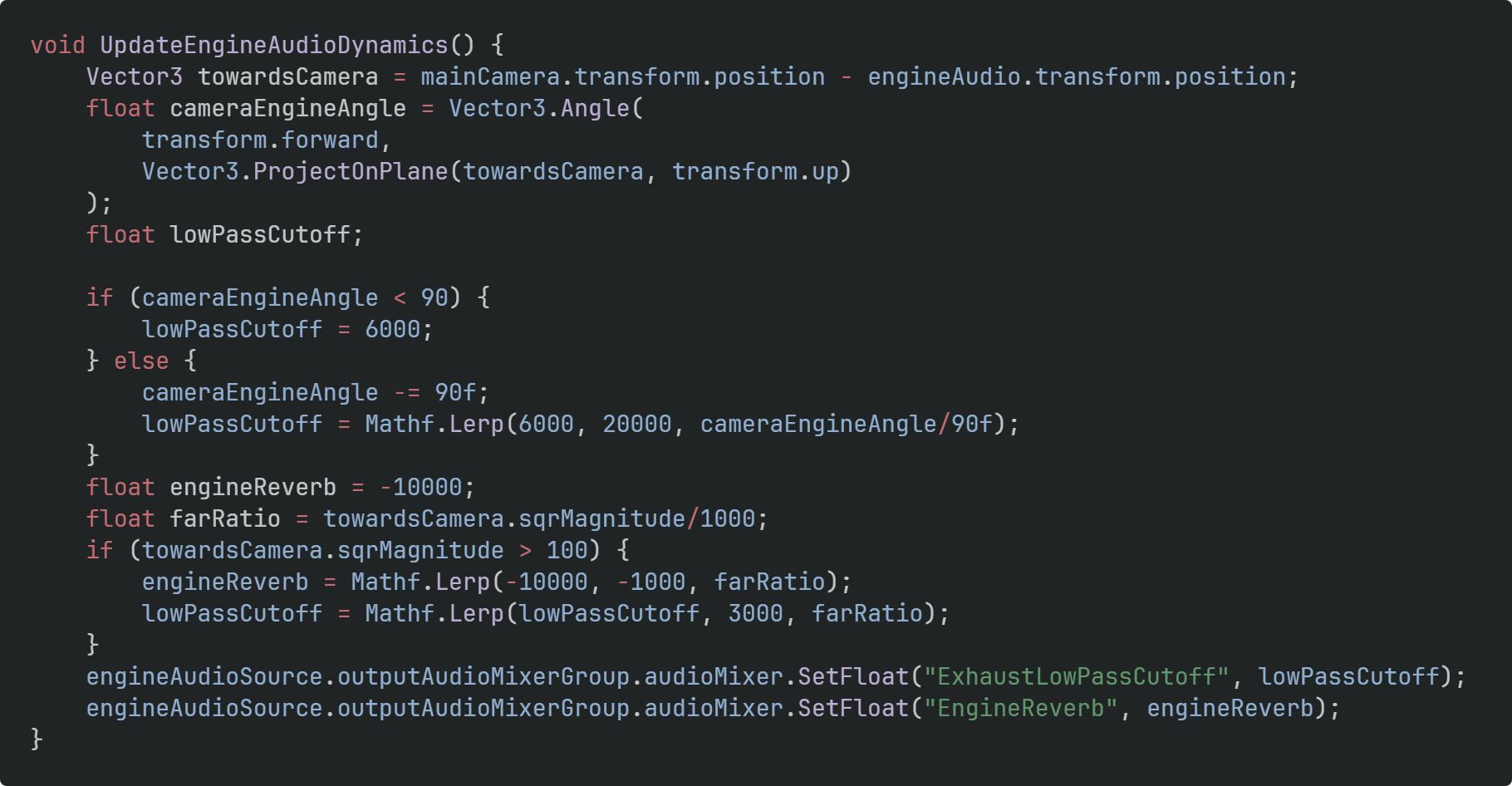
When the player is in front of the car, they don’t hear the audio exhaust note the same way as if they’re behind it. I apply a simple lowpass filter based on camera angle.
I also make the car audio reverb more if it’s further away, as if the sound has more environment things to bounce off. Again, very cheap and approximate, but it does add a bit more.
Thanks for reading!
Comments
Log in with itch.io to leave a comment.
Interesting article. EngineSim is good to know about. Clipping the audio when it is == 0 is also a good insight. I usually do the [sample][sample but backwards] trick to make it 'seamless' but that is only because clipping at 0 didnt occur to me lol.
I'd be interested in knowing you you did the skidding sounds. For my car game I had to search 'electric car drifting' or thereabouts, and grab a portion of the audio from that. Did something similar for engine noise as well. Not ideal as you don't have much control over the output and probably not licenceable in a paid game
I found some cc0 audio on freesound.org (or maybe it was in some giant sound asset pack I bought for $15 years ago) of a car skidding and then crashing into a barrier. I extracted just the skidding part and used the One Simple Trick of turning a somewhat homogeneous sound into a loop with Audacity:
and that’s it, it was one of the easiest sounds to make. I should update the post with that too
Fascinating; I'm learning as many as several new things today. I am also updating quite a bit upward on how complicated Vapor Trails must have been to code, if this is simpler.
(Not actually that surprising given the combo system, I guess, not that I paid much attention to it; I was mostly there for the art and the mobility tech.)
Vapor Trails was complicated for a few reasons:
The mobility tech in VT would be pretty simple to remake at this point, and be way more robust, because of the skills I’ve gained working on an unannounced other professional project. It’s also a 2D game with some cool movement.
Maybe things also just get simpler as I code more.