
X Tutup

Print Hello Python

PythonBeginner
Practice Now

Introduction

This challenge focuses on creating a simple Python script that takes user input and produces formatted output. The exercise reinforces fundamental Python concepts including user input handling and string formatting.

This is a Challenge, which differs from a Guided Lab in that you need to try to complete the challenge task independently, rather than following the steps of a lab to learn. Challenges are usually a bit difficult. If you find it difficult, you can discuss with Labby or check the solution. Historical data shows that this is a beginner level challenge with a 82% pass rate. It has received a 97% positive review rate from learners.

Interactive Python Script

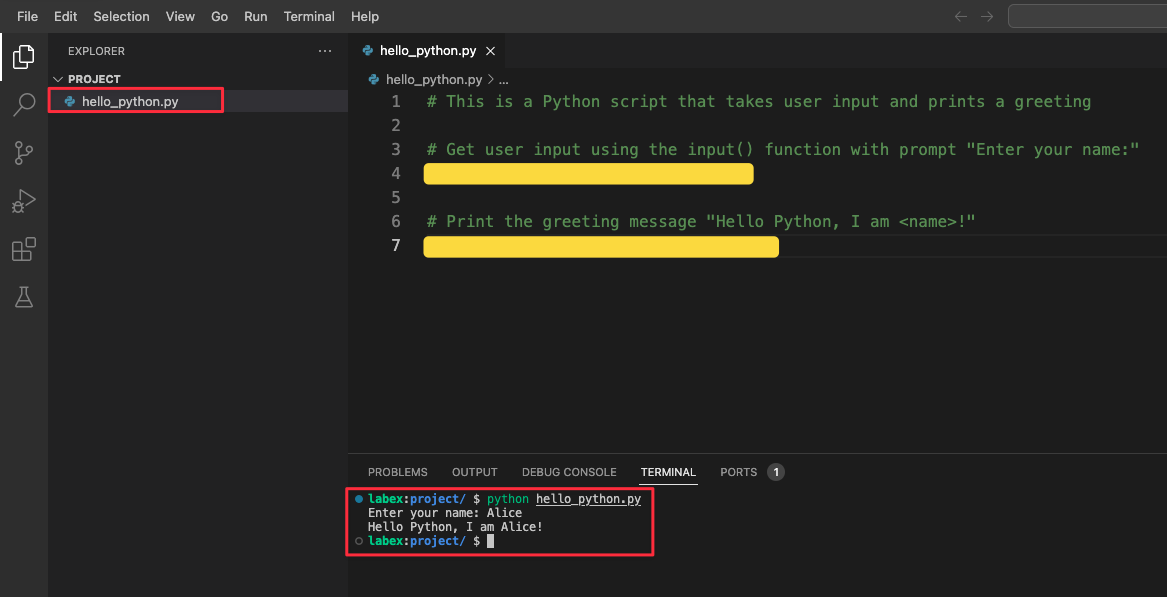
The code editor on the left side of your screen will show the template file hello_python.py. You can click on the file to open it and write your code where you see the TODO comments.

Tasks

  • Complete the Python script by replacing the TODO comments with working code
  • Test your script by running it in the terminal

Requirements

  • Work with the template file /home/labex/project/hello_python.py
  • Replace the first TODO comment with code that:
    • Uses the input() function
    • Shows the prompt text Enter your name:
    • Stores the result in a variable named name
  • Replace the second TODO comment with code that:
    • Uses the print() function
    • Outputs the message Hello Python, I am <name>!
    • Replaces <name> with the stored input value
    • Includes the exclamation mark at the end

Working with the Editor

  1. Click on the file hello_python.py in the file explorer on the left to open it
  2. The editor provides features like:
    • Syntax highlighting for Python code
    • Auto-indentation
    • Line numbers for easy reference
  3. After editing:
    • Save your changes using Ctrl+S (Cmd+S on Mac)
    • Run your script in the terminal using python hello_python.py
Python code editor interface

Example

When running the completed script:

$ python hello_python.py
Enter your name: Alice
Hello Python, I am Alice!
✨ Check Solution and Practice

Summary

In this challenge, you have worked with a Python script template to create an interactive program. The exercise introduced you to essential programming concepts including working with code editors, handling user input with input(), and creating output with print(). You also learned how to run Python scripts from the terminal and saw how template files can help structure your code.

X Tutup

