How to balance this is something I think about a lot, so I’m happy to hear that the way it shows up is working for you, thank you!
Celia
Creator of
Recent community posts
That’s great to hear, thank you!
We shall see if I ever circle back to MFMT or if I have too many new ideas to work on. Right now I’m super busy with my daily word puzzle The Daily Spell, and the other half of Jamwitch, Rose, is busy with life stuff! But I at least am hoping to participate in Ludum Dare in mid-April. 🤞
Just happened across this and was intrigued to give it a shot! I really like this word puzzle and the story you told with it. It must be a great puzzle game since I really wanted to finish it despite finding typing each word multiple times not to be the ideal interface. 🙂 I ended up making my own tool to color the words by length and rearrange them, but then I had to tediously do all the swaps in the game. But I did, because the puzzle was really fun - using the word length to slowly piece together what fit semantically was super satisfying! And the ending was great!
Ah, so sorry folks! Bit of a mix up here, I was not as on top of things as I wished to believe. 😅
I’ve pushed the correct puzzle and article to itch now. Players on the site might also have been affected if you had an open tab you hadn’t refreshed, but refreshing will fix it. And I will not be pushing any incomplete puzzles that I intend to replace later anymore!
Thanks for reporting!
Yes! They’re extremely comfortable and well-fed. 🙂
When Peter pitched this week’s story, I asked, “Does it have to be giant spiders? What about giant silkworms, those would be slightly less creepy,” but he pointed out normally silk worms are killed to harvest their silk, and obviously we can’t have that! So giant spiders it is.
Thank you so much for this thoughtful response! It’s given me a lot to ponder and I really want to try to make some of these adjustments.
I actually call the weeks “chapters” in the code, maybe you’re right that that would be more clear to just show it that way! Thanks! I actually really like the idea of the weekday progress indicator too, let me think about that one…
What you’re saying about the backlog potentially being intimidating vs the experience being better if you get the whole story is something I’ve thought about a lot! I’m totally fine with people who just start playing for a week, get into the puzzles and story, and then decide if they want to go through the backlog. So I hope the way I’m presenting it now with both options works well.
I like what you’re saying about having a tutorial week that’s a real week of puzzles. Some people don’t read the How to Play and just want to dive in, but if I can get them to dive into a tutorial, that would be good. 🙂 I’m now starting to think I should make a Week/Chapter 0 - although it may be fewer than 7 days - that people can start with that will lead to the current Week 1.
I’ll keep thinking and hopefully working on this. Thanks again for sharing your thoughts!
Nice, thank you so much for writing this!
As the dev I’m curious to hear, from your experience or that of friends you’ve introduced it to, can you think of anything that I can change to make it easier to get into? For example, a fuller tutorial experience that takes you through step by step? One thing I have on my mind is the first couple weeks are the least consistent - there are a lot more tricky things like names popping up unexpectedly - so I might revise them to align with how I would do things now. I wonder if that would help if the first couple weeks eased people in a little more?
I’m planning to make a bigger post later (and mention it in the newsletter - sign up for the newsletter!) but thought I’d drop a line about some new UI updates.
I added some screenshots below, but they may have spoilers if you’re not caught up, so read on at your own risk.
-
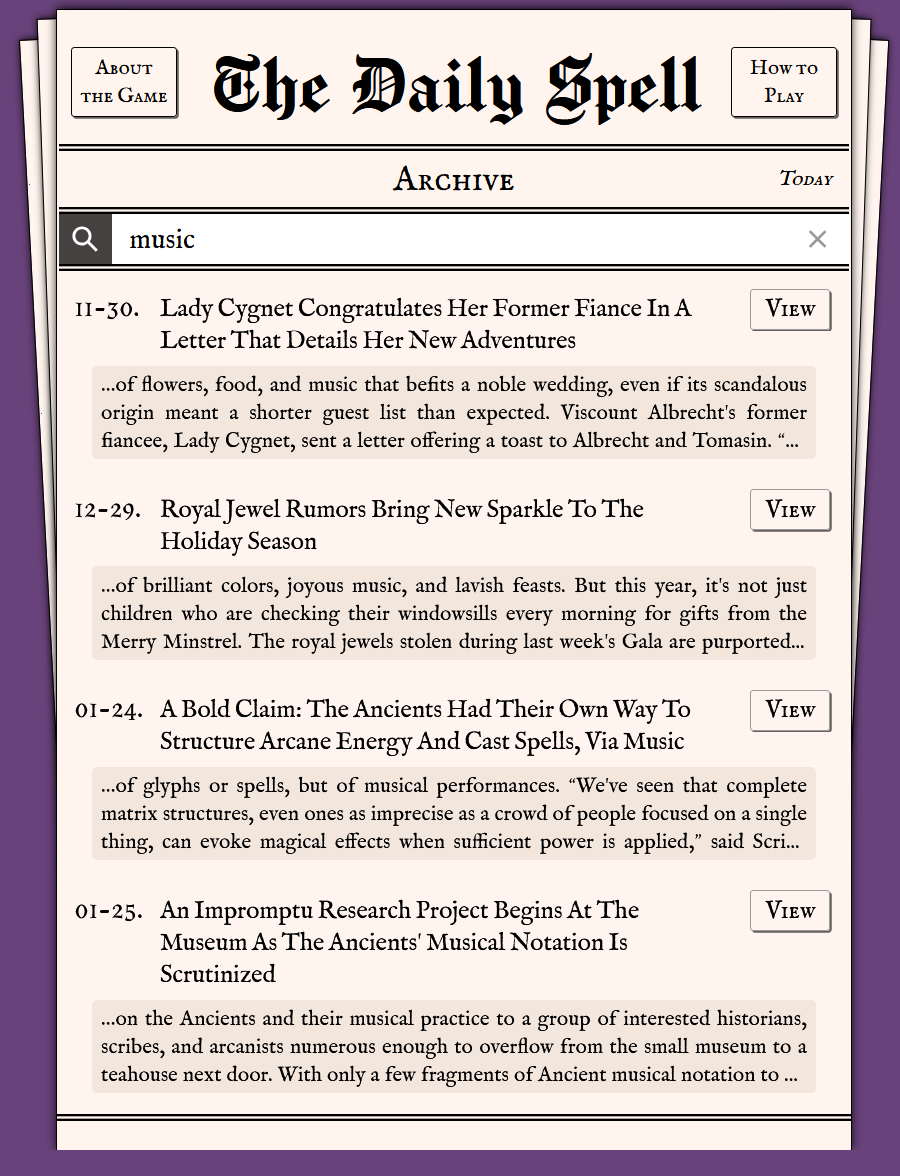
On the archive page, there’s a new nav bar where you can jump directly to a week by number. Hopefully this gives a little bit of structure as the archive gets longer.
-
I also added a search bar! Type words to find all (solved, of course) puzzles/articles that include that exact string. I hope people get a lot of use out of this if you need to refresh your memory about a particular character or term.
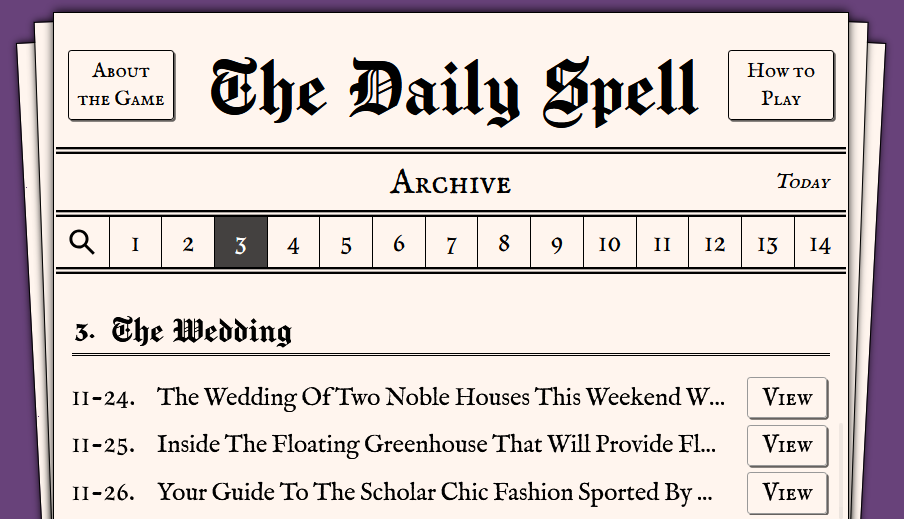
By the time the newsletter comes out (noon EST), I’ll also have bonus puzzles showing on the archive list, but only once you unlock them via the link in the newsletter.
I’ve been meaning to update the archive page for a while, so I’m eager to hear if it’s useful. If you find any bugs or quibbles, bring them on!
Also, a couple puzzle UI changes. These were both suggested by players - thank you!
- You can now swap letters while they’re in the trays by clicking one after the other. You could use this to plan a word even if you don’t know exactly what grid row it goes in.
- If you have a letter in the grid selected, now you can click the empty part of the tray above in order to put it back.
Thanks everyone for playing and giving such great feedback and ideas!
It is a deliberate choice to make the puzzle flow better by having more small connecting words that you can quickly fill in as a starting point, and ideally more sentence-y syntax you can lean on to work out the structure rather than undifferentiated noun-pile headline.
I’m surprised you think it’s more difficult as a sentence than a headline, can you explain more?
I agree it’s not ideal as a headline, and yes, my excuse is they have a different style guide in Yliad, haha.
Thanks for the input! It’s definitely a tricky one since I’ve heard that auto scrolling is convenient, so I don’t want to get rid of it, but adding more complex logic around it could make it seem more unexpected. It helps to hear people’s feedback, thanks.
One thing for this particular case is you could tap the T first, then the spot to put it in, since picking the letter first doesn’t activate the auto scroll. Do you think that would work as a solution to this type of situation?
And the Drop Single Letters button is also there, I hope people make good use of that since I find it pretty convenient when solving.
Aha, that helps a bunch, thanks!
So: Completion stats are stored in your browser’s localStorage, and it looks like you’ve hit a limit to how much data can be stored. This is not expected on its own since the localStorage limit per domain is 5 MB and each day’s stats are pretty small. You could have thousands of days of stats and be fine.
But, I see you’re playing on itch, and on itch, all embedded games’ localStorage records are stored together. So if there are other games that have also saved data to localStorage, they’re taking up TDS’s precious storage space!!
Action from your side:
- My top recommendation is to play on our dedicated site, the-daily-spell.com. The game will always remain available on itch, but I generally recommend players use the site to avoid some complications like this one.
- (Your completion stats will not copy over, so you can just use the Unlock All Past Puzzles buttons to reveal past articles - unless you want to looking into copying and pasting the-daily-spell-stats record from one localStorage to another.)
- Or, if you want to stay on itch, you can try deleting records from localStorage for games you don’t care about to make room (at your own risk 🙂).
What I’ll do: Because under normal circumstances it will be hard to run out of room, I’m not going to do something like start dropping old days’ stats to make room for incoming days, that’s too complex. But I will catch the error so it doesn’t break the whole completion flow like it is now, and show a alert so the next time someone runs into this it’s at least clear what the problem is.
Thanks for stress testing this part of the game! 🫡
Uh oh. I did make a fix recently for the issue where if you navigate to the next puzzle too quickly, it was accidentally revealing that puzzle’s headline (as the original puzzle’s animation completed.) I wonder if that is overzealously blocking completion even on the original puzzle? But I can’t reproduce the problem myself…
- What browser are you using? What input are you using, especially to fill in the final letter - keyboard? Clicking/tapping the letter? The Drop single letters button? Any other actions taken after filling the last letter?
- Can you repro it if you click Replay and fill in the answer again, or only the first time you solve a puzzle? (Try incognito mode if you want to solve a puzzle anew to compare.)
- If you open the dev tools console, any red error messages?
This is pretty mysterious and I want to get to the bottom of it, so thanks for any extra info you have!