
Release Date: 15 April 2020
- The pygad.GA class accepts a new argument named
fitness_funcwhich accepts a function to be used for calculating the fitness values for the solutions. This allows the project to be customized to any problem by building the right fitness function.
Release Date: 4 May 2020
- The pygad.GA attributes are moved from the class scope to the instance scope.
- Raising an exception for incorrect values of the passed parameters.
- Two new parameters are added to the pygad.GA class constructor
(
init_range_lowandinit_range_high) allowing the user to customize the range from which the genes values in the initial population are selected. - The code object
__code__of the passed fitness function is checked to ensure it has the right number of parameters.
Release Date: 13 May 2020
- The fitness function accepts a new argument named
sol_idxrepresenting the index of the solution within the population. - A new parameter to the pygad.GA class constructor named
initial_populationis supported to allow the user to use a custom initial population to be used by the genetic algorithm. If not None, then the passed population will be used. IfNone, then the genetic algorithm will create the initial population using thesol_per_popandnum_genesparameters. - The parameters
sol_per_popandnum_genesare optional and set toNoneby default. - A new parameter named
callback_generationis introduced in the pygad.GA class constructor. It accepts a function with a single parameter representing the pygad.GA class instance. This function is called after each generation. This helps the user to do post-processing or debugging operations after each generation.
Release Date: 14 May 2020
- The
best_solution()method in the pygad.GA class returns a new output representing the index of the best solution within the population. Now, it returns a total of 3 outputs and their order is: best solution, best solution fitness, and best solution index. Here is an example:
solution, solution_fitness, solution_idx = ga_instance.best_solution()
print("Parameters of the best solution :", solution)
print("Fitness value of the best solution :", solution_fitness, "\n")
print("Index of the best solution :", solution_idx, "\n")- A new attribute named
best_solution_generationis added to the instances of the pygad.GA class. it holds the generation number at which the best solution is reached. It is only assigned the generation number after therun()method completes. Otherwise, its value is -1.Example:
print("Best solution reached after {best_solution_generation} generations.".format(best_solution_generation=ga_instance.best_solution_generation))- The
best_solution_fitnessattribute is renamed tobest_solutions_fitness(plural solution). - Mutation is applied independently for the genes.
Release Date: 17 May 2020
- Adding 2 extra modules (pygad.nn and pygad.gann) for building and training neural networks with the genetic algorithm.
Release Date: 18 May 2020
- The initial value of the
generations_completedattribute of instances from the pygad.GA class is0rather thanNone. - An optional bool parameter named
mutation_by_replacementis added to the constructor of the pygad.GA class. It works only when the selected type of mutation is random (mutation_type="random"). In this case, settingmutation_by_replacement=Truemeans replace the gene by the randomly generated value. IfFalse, then it has no effect and random mutation works by adding the random value to the gene. This parameter should be used when the gene falls within a fixed range and its value must not go out of this range. Here are some examples:
Assume there is a gene with the value 0.5.
If mutation_type="random" and mutation_by_replacement=False,
then the generated random value (e.g. 0.1) will be added to the gene
value. The new gene value is 0.5+0.1=0.6.
If mutation_type="random" and mutation_by_replacement=True, then
the generated random value (e.g. 0.1) will replace the gene value. The
new gene value is 0.1.
Nonevalue could be assigned to themutation_typeandcrossover_typeparameters of the pygad.GA class constructor. WhenNone, this means the step is bypassed and has no action.
Release date: 1 June 2020
- A new module named
pygad.cnnis supported for building convolutional neural networks. - A new module named
pygad.gacnnis supported for training convolutional neural networks using the genetic algorithm. - The
pygad.plot_result()method has 3 optional parameters namedtitle,xlabel, andylabelto customize the plot title, x-axis label, and y-axis label, respectively. - The
pygad.nnmodule supports the softmax activation function. - The name of the
pygad.nn.predict_outputs()function is changed topygad.nn.predict(). - The name of the
pygad.nn.train_network()function is changed topygad.nn.train().
Release date: 5 July 2020
- A new parameter named
delay_after_genis added which accepts a non-negative number specifying the time in seconds to wait after a generation completes and before going to the next generation. It defaults to0.0which means no delay after the generation. - The passed function to the
callback_generationparameter of the pygad.GA class constructor can terminate the execution of the genetic algorithm if it returns the stringstop. This causes therun()method to stop.
One important use case for that feature is to stop the genetic algorithm
when a condition is met before passing though all the generations. The
user may assigned a value of 100 to the num_generations parameter of
the pygad.GA class constructor. Assuming that at generation 50, for
example, a condition is met and the user wants to stop the execution
before waiting the remaining 50 generations. To do that, just make the
function passed to the callback_generation parameter to return the
string stop.
Here is an example of a function to be passed to the
callback_generation parameter which stops the execution if the
fitness value 70 is reached. The value 70 might be the best possible
fitness value. After being reached, then there is no need to pass
through more generations because no further improvement is possible.
def func_generation(ga_instance):
 if ga_instance.best_solution()[1] >= 70:
return "stop"Release date: 19 July 2020
- 2 new optional parameters added to the constructor of the
pygad.GAclass which arecrossover_probabilityandmutation_probability.While applying the crossover operation, each parent has a random value generated between 0.0 and 1.0. If this random value is less than or equal to the value assigned to thecrossover_probabilityparameter, then the parent is selected for the crossover operation.For the mutation operation, a random value between 0.0 and 1.0 is generated for each gene in the solution. If this value is less than or equal to the value assigned to themutation_probability, then this gene is selected for mutation. A new optional parameter named
linewidthis added to theplot_result()method to specify the width of the curve in the plot. It defaults to 3.0.Previously, the indices of the genes selected for mutation was randomly generated once for all solutions within the generation. Currently, the genes' indices are randomly generated for each solution in the population. If the population has 4 solutions, the indices are randomly generated 4 times inside the single generation, 1 time for each solution.
Previously, the position of the point(s) for the single-point and two-points crossover was(were) randomly selected once for all solutions within the generation. Currently, the position(s) is(are) randomly selected for each solution in the population. If the population has 4 solutions, the position(s) is(are) randomly generated 4 times inside the single generation, 1 time for each solution.
A new optional parameter named
gene_spaceas added to thepygad.GAclass constructor. It is used to specify the possible values for each gene in case the user wants to restrict the gene values. It is useful if the gene space is restricted to a certain range or to discrete values. For more information, check the More about the ``gene_space` Parameter <https://pygad.readthedocs.io/en/latest/README_pygad_ReadTheDocs.html#more-about-the-gene-space-parameter>`__ section. Thanks to Prof. Tamer A. Farrag for requesting this useful feature.
Release Date: 6 August 2020
- A bug fix in assigning the value to the
initial_populationparameter. - A new parameter named
gene_typeis added to control the gene type. It can be eitherintorfloat. It has an effect only when the parametergene_spaceisNone. - 7 new parameters that accept callback functions:
on_start,on_fitness,on_parents,on_crossover,on_mutation,on_generation, andon_stop.
Release Date: 11 September 2020
- The
learning_rateparameter in thepygad.nn.train()function defaults to 0.01. - Added support of building neural networks for regression using the
new parameter named
problem_type. It is added as a parameter to bothpygad.nn.train()andpygad.nn.predict()functions. The value of this parameter can be either classification or regression to define the problem type. It defaults to classification. - The activation function for a layer can be set to the string
"None"to refer that there is no activation function at this layer. As a result, the supported values for the activation function are"sigmoid","relu","softmax", and"None".
To build a regression network using the pygad.nn module, just do the
following:
- Set the
problem_typeparameter in thepygad.nn.train()andpygad.nn.predict()functions to the string"regression". - Set the activation function for the output layer to the string
"None". This sets no limits on the range of the outputs as it will be from-infinityto+infinity. If you are sure that all outputs will be nonnegative values, then use the ReLU function.
Check the documentation of the pygad.nn module for an example that
builds a neural network for regression. The regression example is also
available at this GitHub
project:
https://github.com/ahmedfgad/NumPyANN
To build and train a regression network using the pygad.gann module,
do the following:
- Set the
problem_typeparameter in thepygad.nn.train()andpygad.nn.predict()functions to the string"regression". - Set the
output_activationparameter in the constructor of thepygad.gann.GANNclass to"None".
Check the documentation of the pygad.gann module for an example that
builds and trains a neural network for regression. The regression
example is also available at this GitHub
project:
https://github.com/ahmedfgad/NeuralGenetic
To build a classification network, either ignore the problem_type
parameter or set it to "classification" (default value). In this
case, the activation function of the last layer can be set to any type
(e.g. softmax).
Release Date: 11 September 2020
- A bug fix when the
problem_typeargument is set toregression.
Release Date: 14 September 2020
- Bug fix to support building and training regression neural networks with multiple outputs.
Release Date: 20 September 2020
- Support of a new module named
kerasgaso that the Keras models can be trained by the genetic algorithm using PyGAD.
Release Date: 3 October 2020
- Bug fix in applying the crossover operation when the
crossover_probabilityparameter is used. Thanks to Eng. Hamada Kassem, Research and Teaching Assistant, Construction Engineering and Management, Faculty of Engineering, Alexandria University, Egypt.
Release Date: 06 December 2020
- The fitness values of the initial population are considered in the
best_solutions_fitnessattribute. - An optional parameter named
save_best_solutionsis added. It defaults toFalse. When it isTrue, then the best solution after each generation is saved into an attribute namedbest_solutions. IfFalse, then no solutions are saved and thebest_solutionsattribute will be empty. - Scattered crossover is supported. To use it, assign the
crossover_typeparameter the value"scattered". - NumPy arrays are now supported by the
gene_spaceparameter. - The following parameters (
gene_type,crossover_probability,mutation_probability,delay_after_gen) can be assigned to a numeric value of any of these data types:int,float,numpy.int,numpy.int8,numpy.int16,numpy.int32,numpy.int64,numpy.float,numpy.float16,numpy.float32, ornumpy.float64.
Release Date: 03 January 2021
- Support of a new module
pygad.torchgato train PyTorch models using PyGAD. Check its documentation. - Support of adaptive mutation where the mutation rate is determined by the fitness value of each solution. Read the Adaptive Mutation section for more details. Also, read this paper: Libelli, S. Marsili, and P. Alba. "Adaptive mutation in genetic algorithms." Soft computing 4.2 (2000): 76-80.
- Before the
run()method completes or exits, the fitness value of the best solution in the current population is appended to thebest_solution_fitnesslist attribute. Note that the fitness value of the best solution in the initial population is already saved at the beginning of the list. So, the fitness value of the best solution is saved before the genetic algorithm starts and after it ends. - When the parameter
parent_selection_typeis set tosss(steady-state selection), then a warning message is printed if the value of thekeep_parentsparameter is set to 0. - More validations to the user input parameters.
- The default value of the
mutation_percent_genesis set to the string"default"rather than the integer 10. This change helps to know whether the user explicitly passed a value to themutation_percent_genesparameter or it is left to its default one. The"default"value is later translated into the integer 10. - The
mutation_percent_genesparameter is no longer accepting the value 0. It must be>0and<=100. - The built-in
warningsmodule is used to show warning messages rather than just using theprint()function. - A new
boolparameter calledsuppress_warningsis added to the constructor of thepygad.GAclass. It allows the user to control whether the warning messages are printed or not. It defaults toFalsewhich means the messages are printed. - A helper method called
adaptive_mutation_population_fitness()is created to calculate the average fitness value used in adaptive mutation to filter the solutions. - The
best_solution()method accepts a new optional parameter calledpop_fitness. It accepts a list of the fitness values of the solutions in the population. IfNone, then thecal_pop_fitness()method is called to calculate the fitness values of the population.
Release Date: 10 January 2021
- In the
gene_spaceparameter, anyNonevalue (regardless of its index or axis), is replaced by a randomly generated number based on the 3 parametersinit_range_low,init_range_high, andgene_type. So, theNonevalue in[..., None, ...]or[..., [..., None, ...], ...]are replaced with random values. This gives more freedom in building the space of values for the genes. - All the numbers passed to the
gene_spaceparameter are casted to the type specified in thegene_typeparameter. - The
numpy.uintdata type is supported for the parameters that accept integer values. - In the
pygad.kerasgamodule, themodel_weights_as_vector()function uses thetrainableattribute of the model's layers to only return the trainable weights in the network. So, only the trainable layers with theirtrainableattribute set toTrue(trainable=True), which is the default value, have their weights evolved. All non-trainable layers with thetrainableattribute set toFalse(trainable=False) will not be evolved. Thanks to Prof. Tamer A. Farrag for pointing about that at GitHub.
Release Date: 15 January 2021
- A bug fix when
save_best_solutions=True. Refer to this issue for more information: ahmedfgad#25
Release Date: 16 February 2021
- In the
gene_spaceargument, the user can use a dictionary to specify the lower and upper limits of the gene. This dictionary must have only 2 items with keyslowandhighto specify the low and high limits of the gene, respectively. This way, PyGAD takes care of not exceeding the value limits of the gene. For a problem with only 2 genes, then usinggene_space=[{'low': 1, 'high': 5}, {'low': 0.2, 'high': 0.81}]means the accepted values in the first gene start from 1 (inclusive) to 5 (exclusive) while the second one has values between 0.2 (inclusive) and 0.85 (exclusive). For more information, please check the Limit the Gene Value Range section of the documentation. - The
plot_result()method returns the figure so that the user can save it. - Bug fixes in copying elements from the gene space.
- For a gene with a set of discrete values (more than 1 value) in the
gene_spaceparameter like[0, 1], it was possible that the gene value may not change after mutation. That is if the current value is 0, then the randomly selected value could also be 0. Now, it is verified that the new value is changed. So, if the current value is 0, then the new value after mutation will not be 0 but 1.
Release Date: 20 February 2021
- 4 new instance attributes are added to hold temporary results after
each generation:
last_generation_fitnessholds the fitness values of the solutions in the last generation,last_generation_parentsholds the parents selected from the last generation,last_generation_offspring_crossoverholds the offspring generated after applying the crossover in the last generation, andlast_generation_offspring_mutationholds the offspring generated after applying the mutation in the last generation. You can access these attributes inside theon_generation()method for example. - A bug fixed when the
initial_populationparameter is used. The bug occurred due to a mismatch between the data type of the array assigned toinitial_populationand the gene type in thegene_typeattribute. Assuming that the array assigned to theinitial_populationparameter is((1, 1), (3, 3), (5, 5), (7, 7))which has typeint. Whengene_typeis set tofloat, then the genes will not be float but casted tointbecause the defined array hasinttype. The bug is fixed by forcing the array assigned toinitial_populationto have the data type in thegene_typeattribute. Check the issue at GitHub: ahmedfgad#27
Thanks to Andrei Rozanski [PhD Bioinformatics Specialist, Department of Tissue Dynamics and Regeneration, Max Planck Institute for Biophysical Chemistry, Germany] for opening my eye to the first change.
Thanks to Marios Giouvanakis, a PhD candidate in Electrical & Computer Engineer, Aristotle University of Thessaloniki (Αριστοτέλειο Πανεπιστήμιο Θεσσαλονίκης), Greece, for emailing me about the second issue.
Release Date: 12 March 2021
- A new
boolparameter calledallow_duplicate_genesis supported. IfTrue, which is the default, then a solution/chromosome may have duplicate gene values. IfFalse, then each gene will have a unique value in its solution. Check the Prevent Duplicates in Gene Values section for more details. - The
last_generation_fitnessis updated at the end of each generation not at the beginning. This keeps the fitness values of the most up-to-date population assigned to thelast_generation_fitnessparameter.
PyGAD 2.14.0 has an issue that is solved in PyGAD 2.14.1. Please consider using 2.14.1 not 2.14.0.
Release Date: 19 May 2021
- Issue
#40
is solved. Now, the
Nonevalue works with thecrossover_typeandmutation_typeparameters: ahmedfgad#40 - The
gene_typeparameter supports accepting alist/tuple/numpy.ndarrayof numeric data types for the genes. This helps to control the data type of each individual gene. Previously, thegene_typecan be assigned only to a single data type that is applied for all genes. For more information, check the More about the ``gene_type` Parameter <https://pygad.readthedocs.io/en/latest/README_pygad_ReadTheDocs.html#more-about-the-gene-type-parameter>`__ section. Thanks to Rainer Engel for asking about this feature in this discussion: ahmedfgad#43 - A new
boolattribute namedgene_type_singleis added to thepygad.GAclass. It isTruewhen there is a single data type assigned to thegene_typeparameter. When thegene_typeparameter is assigned alist/tuple/numpy.ndarray, thengene_type_singleis set toFalse. - The
mutation_by_replacementflag now has no effect ifgene_spaceexists except for the genes withNonevalues. For example, forgene_space=[None, [5, 6]]themutation_by_replacementflag affects only the first gene which hasNonefor its value space. - When an element has a value of
Nonein thegene_spaceparameter (e.g.gene_space=[None, [5, 6]]), then its value will be randomly generated for each solution rather than being generate once for all solutions. Previously, the gene withNonevalue ingene_spaceis the same across all solutions - Some changes in the documentation according to issue #32: ahmedfgad#32
Release Date: 27 May 2021
- Some bug fixes when the
gene_typeparameter is nested. Thanks to Rainer Engel for opening a discussion to report this bug: ahmedfgad#43 (reply in thread)
Rainer Engel helped a lot in suggesting new features and suggesting enhancements in 2.14.0 to 2.14.2 releases.
Release Date: 6 June 2021
- Some bug fixes when setting the
save_best_solutionsparameter toTrue. Previously, the best solution for generationiwas added into thebest_solutionsattribute at generationi+1. Now, thebest_solutionsattribute is updated by each best solution at its exact generation.
Release Date: 17 June 2021
- Control the precision of all genes/individual genes. Thanks to Rainer for asking about this feature: ahmedfgad#43 (comment)
- A new attribute named
last_generation_parents_indicesholds the indices of the selected parents in the last generation. - In adaptive mutation, no need to recalculate the fitness values of
the parents selected in the last generation as these values can be
returned based on the
last_generation_fitnessandlast_generation_parents_indicesattributes. This speeds-up the adaptive mutation. - When a sublist has a value of
Nonein thegene_spaceparameter (e.g.gene_space=[[1, 2, 3], [5, 6, None]]), then its value will be randomly generated for each solution rather than being generated once for all solutions. Previously, a value ofNonein a sublist of thegene_spaceparameter was identical across all solutions. - The dictionary assigned to the
gene_spaceparameter itself or one of its elements has a new key called"step"to specify the step of moving from the start to the end of the range specified by the 2 existing keys"low"and"high". An example is{"low": 0, "high": 30, "step": 2}to have only even values for the gene(s) starting from 0 to 30. For more information, check the More about the ``gene_space` Parameter <https://pygad.readthedocs.io/en/latest/README_pygad_ReadTheDocs.html#more-about-the-gene-space-parameter>`__ section. ahmedfgad#48 - A new function called
predict()is added in both thepygad.kerasgaandpygad.torchgamodules to make predictions. This makes it easier than using custom code each time a prediction is to be made. - A new parameter called
stop_criteriaallows the user to specify one or more stop criteria to stop the evolution based on some conditions. Each criterion is passed asstrwhich has a stop word. The current 2 supported words arereachandsaturate.reachstops therun()method if the fitness value is equal to or greater than a given fitness value. An example forreachis"reach_40"which stops the evolution if the fitness is >= 40.saturatemeans stop the evolution if the fitness saturates for a given number of consecutive generations. An example forsaturateis"saturate_7"which means stop therun()method if the fitness does not change for 7 consecutive generations. Thanks to Rainer for asking about this feature: ahmedfgad#44 - A new bool parameter, defaults to
False, namedsave_solutionsis added to the constructor of thepygad.GAclass. IfTrue, then all solutions in each generation are appended into an attribute calledsolutionswhich is NumPy array. - The
plot_result()method is renamed toplot_fitness(). The users should migrate to the new name as the old name will be removed in the future. - Four new optional parameters are added to the
plot_fitness()function in thepygad.GAclass which arefont_size=14,save_dir=None,color="#3870FF", andplot_type="plot". Usefont_sizeto change the font of the plot title and labels.save_diraccepts the directory to which the figure is saved. It defaults toNonewhich means do not save the figure.colorchanges the color of the plot.plot_typechanges the plot type which can be either"plot"(default),"scatter", or"bar". ahmedfgad#47 - The default value of the
titleparameter in theplot_fitness()method is"PyGAD - Generation vs. Fitness"rather than"PyGAD - Iteration vs. Fitness". - A new method named
plot_new_solution_rate()creates, shows, and returns a figure showing the rate of new/unique solutions explored in each generation. It accepts the same parameters as in theplot_fitness()method. This method only works whensave_solutions=Truein thepygad.GAclass's constructor. - A new method named
plot_genes()creates, shows, and returns a figure to show how each gene changes per each generation. It accepts similar parameters like theplot_fitness()method in addition to thegraph_type,fill_color, andsolutionsparameters. Thegraph_typeparameter can be either"plot"(default),"boxplot", or"histogram".fill_coloraccepts the fill color which works whengraph_typeis either"boxplot"or"histogram".solutionscan be either"all"or"best"to decide whether all solutions or only best solutions are used. - The
gene_typeparameter now supports controlling the precision offloatdata types. For a gene, rather than assigning just the data type likefloat, assign alist/tuple/numpy.ndarraywith 2 elements where the first one is the type and the second one is the precision. For example,[float, 2]forces a gene with a value like0.1234to be0.12. For more information, check the More about the ``gene_type` Parameter <https://pygad.readthedocs.io/en/latest/README_pygad_ReadTheDocs.html#more-about-the-gene-type-parameter>`__ section.
The PyGAD library is available at PyPI at this page https://pypi.org/project/pygad. PyGAD is built out of a number of open-source GitHub projects. A brief note about these projects is given in the next subsections.
GitHub Link: https://github.com/ahmedfgad/GeneticAlgorithmPython
GeneticAlgorithmPython is the first project which is an open-source Python 3 project for implementing the genetic algorithm based on NumPy.
GitHub Link: https://github.com/ahmedfgad/NumPyANN
NumPyANN builds artificial neural networks in Python 3 using NumPy from scratch. The purpose of this project is to only implement the forward pass of a neural network without using a training algorithm. Currently, it only supports classification and later regression will be also supported. Moreover, only one class is supported per sample.
GitHub Link: https://github.com/ahmedfgad/NeuralGenetic
NeuralGenetic trains neural networks using the genetic algorithm based on the previous 2 projects GeneticAlgorithmPython and NumPyANN.
GitHub Link: https://github.com/ahmedfgad/NumPyCNN
NumPyCNN builds convolutional neural networks using NumPy. The purpose of this project is to only implement the forward pass of a convolutional neural network without using a training algorithm.
GitHub Link: https://github.com/ahmedfgad/CNNGenetic
CNNGenetic trains convolutional neural networks using the genetic algorithm. It uses the GeneticAlgorithmPython project for building the genetic algorithm.
GitHub Link: https://github.com/ahmedfgad/KerasGA
KerasGA trains Keras models using the genetic algorithm. It uses the GeneticAlgorithmPython project for building the genetic algorithm.
GitHub Link: https://github.com/ahmedfgad/TorchGA
TorchGA trains PyTorch models using the genetic algorithm. It uses the GeneticAlgorithmPython project for building the genetic algorithm.
pygad.torchga: https://github.com/ahmedfgad/TorchGA
If there is an issue using PyGAD, then use any of your preferred option to discuss that issue.
One way is submitting an issue into this GitHub project (github.com/ahmedfgad/GeneticAlgorithmPython) in case something is not working properly or to ask for questions.
If this is not a proper option for you, then check the Contact Us section for more contact details.
PyGAD is actively developed with the goal of building a dynamic library for suporting a wide-range of problems to be optimized using the genetic algorithm.
To ask for a new feature, either submit an issue into this GitHub project (github.com/ahmedfgad/GeneticAlgorithmPython) or send an e-mail to ahmed.f.gad@gmail.com.
Also check the Contact Us section for more contact details.
If you created a project that uses PyGAD, then we can support you by mentioning this project here in PyGAD's documentation.
To do that, please send a message at ahmed.f.gad@gmail.com or check the Contact Us section for more contact details.
Within your message, please send the following details:
- Project title
- Brief description
- Preferably, a link that directs the readers to your project
In this tutorial, we’ll see why mutation with a fixed number of genes is bad, and how to replace it with adaptive mutation. Using the PyGAD Python 3 library, we’ll discuss a few examples that use both random and adaptive mutation.
This tutorial discusses how the genetic algorithm is used to cluster data, starting from random clusters and running until the optimal clusters are found. We'll start by briefly revising the K-means clustering algorithm to point out its weak points, which are later solved by the genetic algorithm. The code examples in this tutorial are implemented in Python using the PyGAD library.
Depending on the nature of the problem being optimized, the genetic algorithm (GA) supports two different gene representations: binary, and decimal. The binary GA has only two values for its genes, which are 0 and 1. This is easier to manage as its gene values are limited compared to the decimal GA, for which we can use different formats like float or integer, and limited or unlimited ranges.
This tutorial discusses how the PyGAD library supports the two GA representations, binary and decimal.
This tutorial introduces PyGAD, an open-source Python library for implementing the genetic algorithm and training machine learning algorithms. PyGAD supports 19 parameters for customizing the genetic algorithm for various applications.
Within this tutorial we'll discuss 5 different applications of the genetic algorithm and build them using PyGAD.
The genetic algorithm (GA) is a biologically-inspired optimization algorithm. It has in recent years gained importance, as it’s simple while also solving complex problems like travel route optimization, training machine learning algorithms, working with single and multi-objective problems, game playing, and more.
Deep neural networks are inspired by the idea of how the biological brain works. It’s a universal function approximator, which is capable of simulating any function, and is now used to solve the most complex problems in machine learning. What’s more, they’re able to work with all types of data (images, audio, video, and text).
Both genetic algorithms (GAs) and neural networks (NNs) are similar, as both are biologically-inspired techniques. This similarity motivates us to create a hybrid of both to see whether a GA can train NNs with high accuracy.
This tutorial uses PyGAD, a Python library that supports building and training NNs using a GA. PyGAD offers both classification and regression NNs.
In this tutorial we'll see how to build a game-playing agent using only the genetic algorithm to play a game called CoinTex, which is developed in the Kivy Python framework. The objective of CoinTex is to collect the randomly distributed coins while avoiding collision with fire and monsters (that move randomly). The source code of CoinTex can be found on GitHub.
The genetic algorithm is the only AI used here; there is no other machine/deep learning model used with it. We'll implement the genetic algorithm using PyGad. This tutorial starts with a quick overview of CoinTex followed by a brief explanation of the genetic algorithm, and how it can be used to create the playing agent. Finally, we'll see how to implement these ideas in Python.
The source code of the genetic algorithm agent is available here, and you can download the code used in this tutorial from here.
PyGAD is an open-source Python library for building the genetic algorithm and training machine learning algorithms. It offers a wide range of parameters to customize the genetic algorithm to work with different types of problems.
PyGAD has its own modules that support building and training neural networks (NNs) and convolutional neural networks (CNNs). Despite these modules working well, they are implemented in Python without any additional optimization measures. This leads to comparatively high computational times for even simple problems.
The latest PyGAD version, 2.8.0 (released on 20 September 2020), supports a new module to train Keras models. Even though Keras is built in Python, it's fast. The reason is that Keras uses TensorFlow as a backend, and TensorFlow is highly optimized.
This tutorial discusses how to train Keras models using PyGAD. The discussion includes building Keras models using either the Sequential Model or the Functional API, building an initial population of Keras model parameters, creating an appropriate fitness function, and more.

PyGAD is a genetic algorithm Python 3 library for solving optimization problems. One of these problems is training machine learning algorithms.
PyGAD has a module called pygad.kerasga. It trains Keras models using the genetic algorithm. On January 3rd, 2021, a new release of PyGAD 2.10.0 brought a new module called pygad.torchga to train PyTorch models. It’s very easy to use, but there are a few tricky steps.
So, in this tutorial, we’ll explore how to use PyGAD to train PyTorch models.

Cómo los algoritmos genéticos pueden competir con el descenso de gradiente y el backprop
Bien que la manière standard d'entraîner les réseaux de neurones soit la descente de gradient et la rétropropagation, il y a d'autres joueurs dans le jeu. L'un d'eux est les algorithmes évolutionnaires, tels que les algorithmes génétiques.
Utiliser un algorithme génétique pour former un réseau de neurones simple pour résoudre le OpenAI CartPole Jeu. Dans cet article, nous allons former un simple réseau de neurones pour résoudre le OpenAI CartPole . J'utiliserai PyTorch et PyGAD .

Cómo los algoritmos genéticos pueden competir con el descenso de gradiente y el backprop
Aunque la forma estandar de entrenar redes neuronales es el descenso de gradiente y la retropropagacion, hay otros jugadores en el juego, uno de ellos son los algoritmos evolutivos, como los algoritmos geneticos.
Usa un algoritmo genetico para entrenar una red neuronal simple para resolver el Juego OpenAI CartPole. En este articulo, entrenaremos una red neuronal simple para resolver el OpenAI CartPole . Usare PyTorch y PyGAD .


파이썬에서 genetic algorithm을 사용하는 패키지들을 다 사용해보진 않았지만, 확장성이 있어보이고, 시도할 일이 있어서 살펴봤다.
이 패키지에서 가장 인상 깊었던 것은 neural network에서 hyper parameter 탐색을 gradient descent 방식이 아닌 GA로도 할 수 있다는 것이다.
개인적으로 이 부분이 어느정도 초기치를 잘 잡아줄 수 있는 역할로도 쓸 수 있고, Loss가 gradient descent 하기 어려운 구조에서 대안으로 쓸 수 있을 것으로도 생각된다.
일단 큰 흐름은 다음과 같이 된다.
사실 완전히 흐름이나 각 parameter에 대한 이해는 부족한 상황
This is a translation of an original English tutorial published at Paperspace: How To Train Keras Models Using the Genetic Algorithm with PyGAD
PyGAD, genetik algoritma oluşturmak ve makine öğrenimi algoritmalarını eğitmek için kullanılan açık kaynaklı bir Python kitaplığıdır. Genetik algoritmayı farklı problem türleri ile çalışacak şekilde özelleştirmek için çok çeşitli parametreler sunar.
PyGAD, sinir ağları (NN’ler) ve evrişimli sinir ağları (CNN’ler) oluşturmayı ve eğitmeyi destekleyen kendi modüllerine sahiptir. Bu modüllerin iyi çalışmasına rağmen, herhangi bir ek optimizasyon önlemi olmaksızın Python’da uygulanırlar. Bu, basit problemler için bile nispeten yüksek hesaplama sürelerine yol açar.
En son PyGAD sürümü 2.8.0 (20 Eylül 2020'de piyasaya sürüldü), Keras modellerini eğitmek için yeni bir modülü destekliyor. Keras Python’da oluşturulmuş olsa da hızlıdır. Bunun nedeni, Keras’ın arka uç olarak TensorFlow kullanması ve TensorFlow’un oldukça optimize edilmiş olmasıdır.
Bu öğreticide, PyGAD kullanılarak Keras modellerinin nasıl eğitileceği anlatılmaktadır. Tartışma, Sıralı Modeli veya İşlevsel API’yi kullanarak Keras modellerini oluşturmayı, Keras model parametrelerinin ilk popülasyonunu oluşturmayı, uygun bir uygunluk işlevi oluşturmayı ve daha fazlasını içerir.

Tensorflow alapozó 10. Neurális hálózatok tenyésztése genetikus algoritmussal PyGAD és OpenAI Gym használatával
Hogy kontextusba helyezzem a genetikus algoritmusokat, ismételjük kicsit át, hogy hogyan működik a gradient descent és a backpropagation, ami a neurális hálók tanításának általános módszere. Az erről írt cikkemet itt tudjátok elolvasni.
A hálózatok tenyésztéséhez a PyGAD nevű programkönyvtárat használjuk, így mindenek előtt ezt kell telepítenünk, valamint a Tensorflow-t és a Gym-et, amit Colabban már eleve telepítve kapunk.
Maga a PyGAD egy teljesen általános genetikus algoritmusok futtatására képes rendszer. Ennek a kiterjesztése a KerasGA, ami az általános motor Tensorflow (Keras) neurális hálókon történő futtatását segíti. A 47. sorban létrehozott KerasGA objektum ennek a kiterjesztésnek a része és arra szolgál, hogy a paraméterként átadott modellből a második paraméterben megadott számosságú populációt hozzon létre. Mivel a hálózatunk 386 állítható paraméterrel rendelkezik, ezért a DNS-ünk itt 386 elemből fog állni. A populáció mérete 10 egyed, így a kezdő populációnk egy 10x386 elemű mátrix lesz. Ezt adjuk át az 51. sorban az initial_population paraméterben.
PyGAD — это библиотека для имплементации генетического алгоритма. Кроме того, библиотека предоставляет доступ к оптимизированным реализациям алгоритмов машинного обучения. PyGAD разрабатывали на Python 3.
Библиотека PyGAD поддерживает разные типы скрещивания, мутации и селекции родителя. PyGAD позволяет оптимизировать проблемы с помощью генетического алгоритма через кастомизацию целевой функции.
Кроме генетического алгоритма, библиотека содержит оптимизированные имплементации алгоритмов машинного обучения. На текущий момент PyGAD поддерживает создание и обучение нейросетей для задач классификации.
Библиотека находится в стадии активной разработки. Создатели планируют добавление функционала для решения бинарных задач и имплементации новых алгоритмов.
PyGAD разрабатывали на Python 3.7.3. Зависимости включают в себя NumPy для создания и манипуляции массивами и Matplotlib для визуализации. Один из изкейсов использования инструмента — оптимизация весов, которые удовлетворяют заданной функции.
There are different resources that can be used to get started with the genetic algorithm and building it in Python.
To start with coding the genetic algorithm, you can check the tutorial titled Genetic Algorithm Implementation in Python available at these links:
This tutorial is prepared based on a previous version of the project but it still a good resource to start with coding the genetic algorithm.

Get started with the genetic algorithm by reading the tutorial titled Introduction to Optimization with Genetic Algorithm which is available at these links:
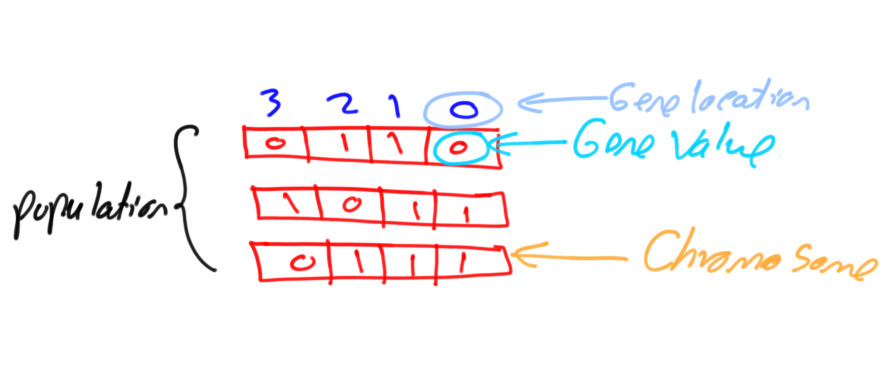
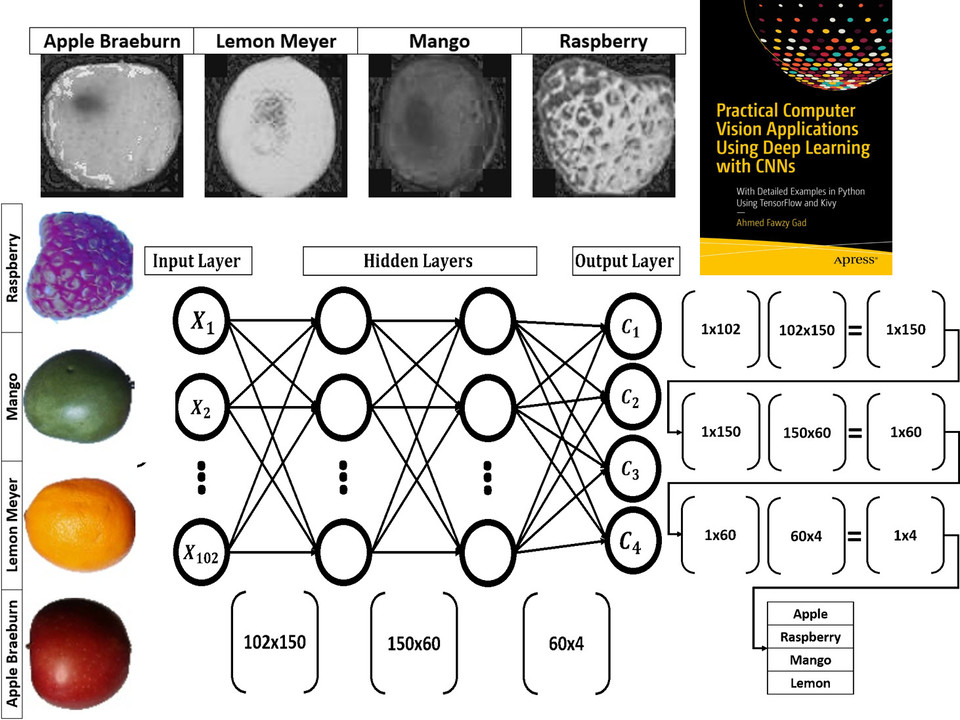
Read about building neural networks in Python through the tutorial titled Artificial Neural Network Implementation using NumPy and Classification of the Fruits360 Image Dataset available at these links:
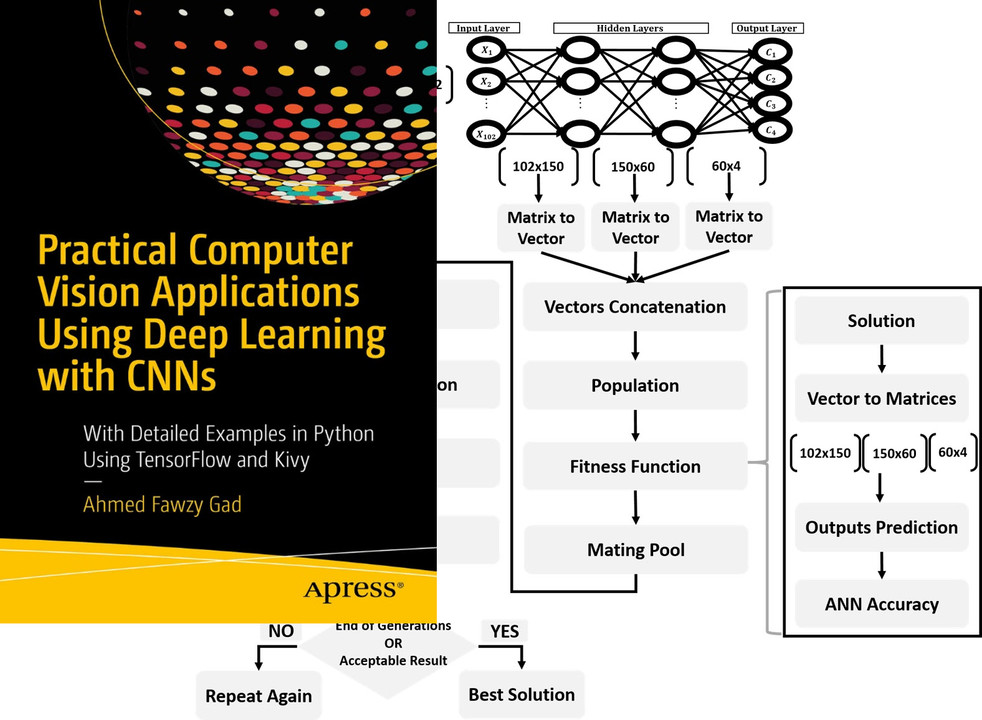
Read about training neural networks using the genetic algorithm through the tutorial titled Artificial Neural Networks Optimization using Genetic Algorithm with Python available at these links:
To start with coding the genetic algorithm, you can check the tutorial titled Building Convolutional Neural Network using NumPy from Scratch available at these links:
This tutorial) is prepared based on a previous version of the project but it still a good resource to start with coding CNNs.
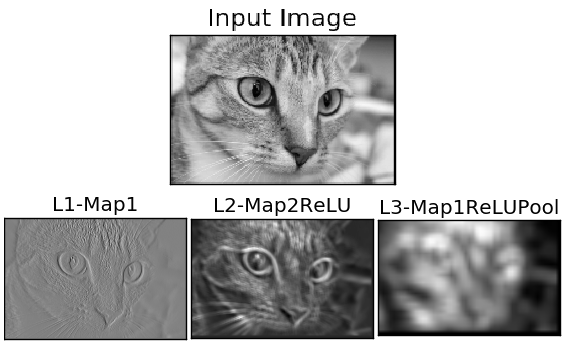
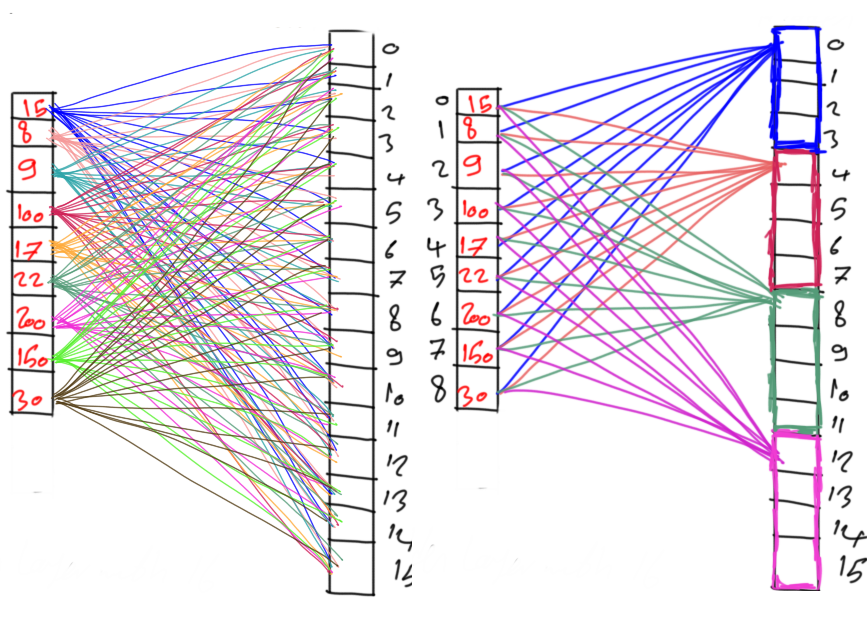
Get started with the genetic algorithm by reading the tutorial titled Derivation of Convolutional Neural Network from Fully Connected Network Step-By-Step which is available at these links:
You can also check my book cited as Ahmed Fawzy Gad 'Practical Computer Vision Applications Using Deep Learning with CNNs'. Dec. 2018, Apress, 978-1-4842-4167-7 which discusses neural networks, convolutional neural networks, deep learning, genetic algorithm, and more.
Find the book at these links:

- E-mail: ahmed.f.gad@gmail.com
- Amazon Author Page
- Heartbeat
- Paperspace
- KDnuggets
- TowardsDataScience
- GitHub
Thank you for using PyGAD :)