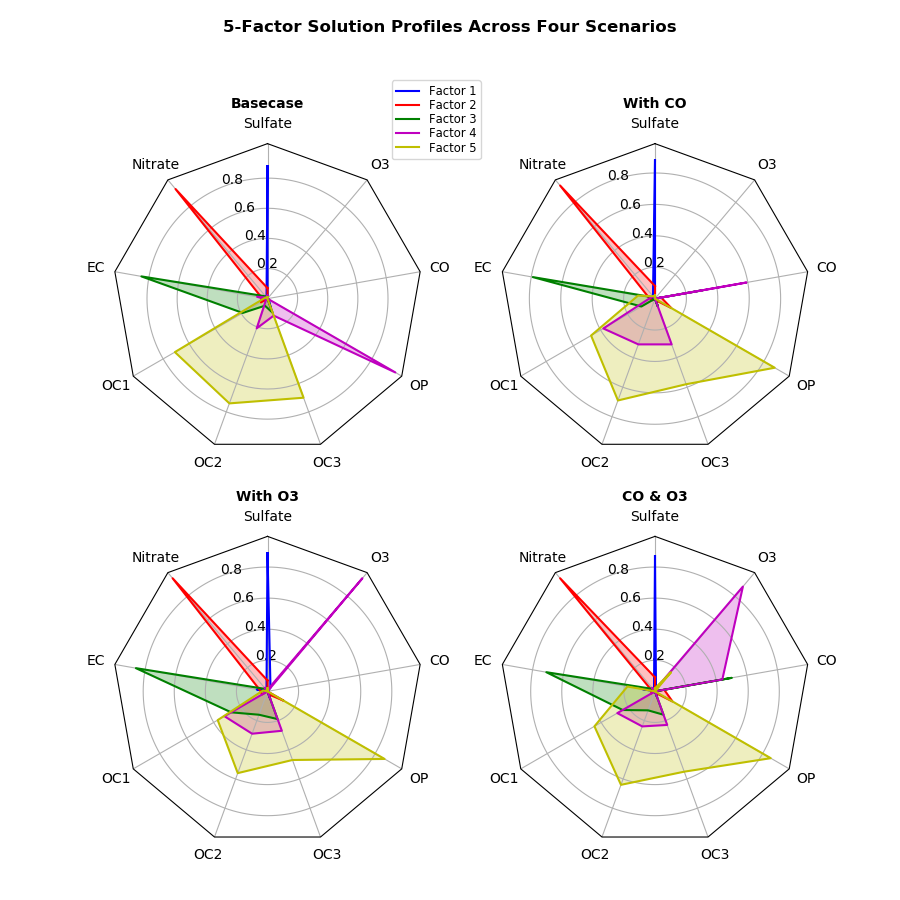
API question with polar plotting versus Radar chart#10561
API question with polar plotting versus Radar chart#10561x-meowzilla wants to merge 13 commits intomatplotlib:masterfrom
Conversation


…erpolation steps prior to drawing
# Conflicts:
#	examples/api/radar_chart.py
 jklymak
changed the title
jklymak
changed the title

|
I have not yet push the image comparison test, @image_comparison(baseline_images=['polar_polygon_filling'], extensions=['png'],
style='mpl20', remove_text=True)
def test_polar_polygon_filling():
x = np.linspace(0, np.pi, 5)
y = np.abs(np.sin(x))
fig = plt.figure(figsize=(6.4, 4.8))
ax = fig.add_subplot(1, 1, 1, polar=True)
# ax.set_rmax(1.5)
ax.plot(x, y)Is there any ways to improve the accuracy? |

|
Sorry so we should close the other PR, right? |
|
If the output is correct, then we can close the other PR. |

|
I don't think so; there's nothing wrong with the radar chart in current code. It's only if you apply the other PR that the problem occurs. |

|
My impression is that the fundamental problem is with our API, and none of the related PRs fix that. For non-Cartesian coordinates, one should be able to specify the interpolation policy in a kwarg for each artist, and there should be a consistent and sensible default--presumably the one from rcParams. Then the radar example would simply specify 'interpolation_steps=1, or maybe "connection='straight'" (versus 'curved') for each patch. Or maybe it is a matter of interpolation in "data_space" versus "screen_space". Cartopy handles this sort of thing, doesn't it? |
 efiring
changed the title
efiring
changed the title
|
I changed the title because it was misleading; based on @QuLogic's comment, there was no breakage. |
|
Feel free to re-open if this is still a going concern, but from the above it looks like this is not needed? |
4 participants


PR Summary
Fixed polygon not correctly filled in polar plot #9261
Override fill() method in PolarAxes class, where the filling polygon should have straight edges in polar axis instead of curved edges, the _interpolation_step field should not be changed for these filling polygons.
This PR includes the changes from #10488.
The radar chart should produce the output as expected.