|
| 1 | +--- |
| 2 | +layout: post |
| 3 | +title: MVP模式探索——TheMVP的尝试和扩展 |
| 4 | +subtitle: MVP模式探索2 |
| 5 | +date: 2018-03-21 |
| 6 | +author: YANKEBIN |
| 7 | +catalog: true |
| 8 | +tags: |
| 9 | + - Android |
| 10 | + - MVP |
| 11 | + - 设计模式 |
| 12 | +--- |
| 13 | + |
| 14 | +# 前言 |
| 15 | +正所谓打铁要乘热,今天开我们开始探究MVP的第二阶段,来看一看MVP模式里面我所用到过的一个变种——TheMVP。 |
| 16 | + |
| 17 | +如果对MVP还完全不了解的童鞋,请移步 |
| 18 | + |
| 19 | +>[MVP模式探索——初识](https://ykbjson.github.io/2018/03/20/MVP%E6%A8%A1%E5%BC%8F%E6%8E%A2%E7%B4%A2-%E5%88%9D%E8%AF%86/) |
| 20 | +
|
| 21 | +想要细致的了解theMvp,请参考原文链接,且一定要看到最后 |
| 22 | + |
| 23 | +>[用MVP架构开发Android应用](https://www.kymjs.com/code/2015/11/09/01/) |
| 24 | +
|
| 25 | +为什么强调要看到最后?因为作者有些补充,这些补充可以让你清醒的认识到自己的项目是否适合theMVP模式开发以及theMVP模式的一些缺点和限制。 |
| 26 | + |
| 27 | +# TheMVP的出现原因 |
| 28 | + |
| 29 | +MVP模式虽然被大力推广和使用,但是他必然也是有缺点的,所以才有了这么多MVP模式的扩展和变种。传统MVP模式在Android开发中的缺点大概有以下几点 |
| 30 | + |
| 31 | +1. 当应用进入后台且内存不足的时候,系统是会回收这个Activity的。通常我们都知道要用OnSaveInstanceState()去保存状态,用OnRestoreInstanceState()去恢复状态。 但是在我们的MVP中,View层是不应该去直接操作Model的,这样做不合理,同时也增大了M与V的耦合。 |
| 32 | + |
| 33 | +2. 界面复用问题。通常我们在APP最初版本中是无法预料到以后会有什么变动的,例如我们最初使用一个Fragment去作为界面的显示,后来在版本变动中发现这个Fragment越来越庞大,而Fragment的生命周期又太过复杂造成很多难以理解的BUG,我们需要把这个界面放到一个Activity中实现。这时候就麻烦了,要把Fragment转成Activity,这可不仅仅是改改类名的问题,更多的是一大堆生命周期需要去修改。例如参考文章2中的译者就遇到过这样的问题。 |
| 34 | + |
| 35 | +3. Activity本身就是Android中的一个Context。不论怎么去封装,都难以避免将业务逻辑代码写入到其中。 |
| 36 | + |
| 37 | + |
| 38 | +既然知道了这些问题,我们的解决办法自然是不要将Activity作为View层而去单独包含Presenter类进来。反过来,我们将Activity(Fragment)作为Presenter层的代码,包含一个View层的类来。如果你同时是一名IOS开发者,你一定会很熟悉,这不就是ViewController和APPDelegate吗。 |
| 39 | + |
| 40 | +使用Activity作为Presenter的优点就在于,可以原封不动的使用Activity本身的生命周期去处理项目逻辑,而不需要强加给另一个包含类,甚至记忆额外自定义的生命周期。 |
| 41 | + |
| 42 | +而同时作为独立的View层,我们的视图可以原封不动的传递给Presenter(不管是Activity或者Fragment),而不需要改任何代码。对于一个开发团队,完全可以将View层的东西交给一个人编写,而将业务实现交给另一个人编写。而随着逻辑变化对View的更改,只需要通过Presenter层的包含一个代理对象————ViewDelegate来操作相应的更改方法就够了。 |
| 43 | + |
| 44 | +# theMVP的原理 |
| 45 | + |
| 46 | +与传统androidMVP不同(原因上文已经说了),TheMVP使用Activity作为Presenter层来处理代码逻辑,通过让Activity包含一个ViewDelegate对象来间接操作View层对外提供的方法,从而做到完全解耦视图层。如下图 |
| 47 | + |
| 48 | +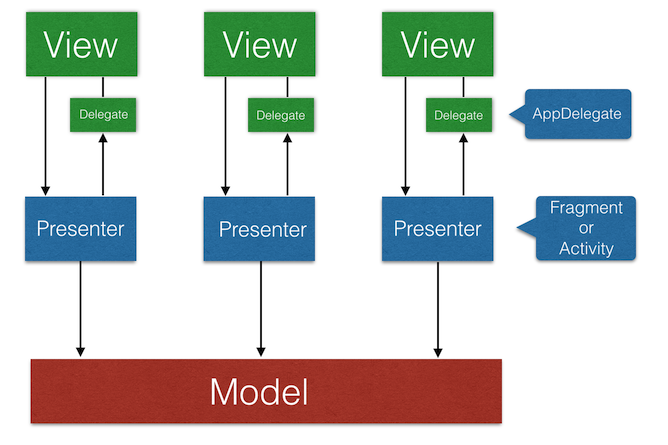 |
| 49 | + |
| 50 | +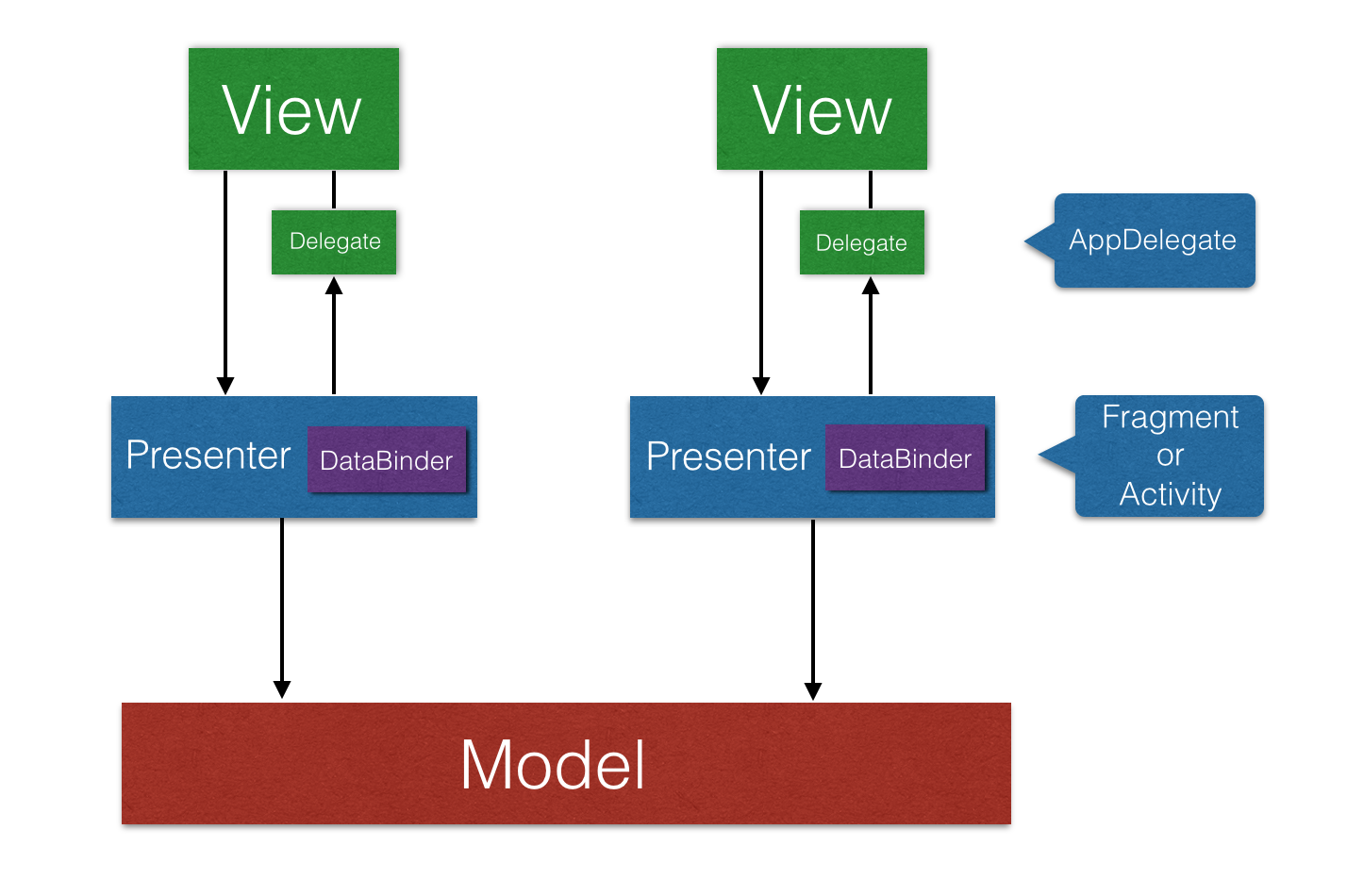 |
| 51 | + |
| 52 | +# theMVP的代码实现 |
| 53 | + |
| 54 | +[An Android MVP Architecture Diagram Framwork](https://github.com/kymjs/TheMVP) |
| 55 | + |
| 56 | +关于theMVP的相关信息,大概就介绍到这里,本来我打算阐述一下我在项目里使用theMvp的过程和修改,但是我回过头去看以前的项目的时候,发现有很多地方其实变化不大,还有就是theMVP使用起来本身就很简单,创造者在他的demo里也写了很多使用方式,我就不再这里班门弄斧了。 |
| 57 | + |
| 58 | +# theMVP的扩展实现 |
| 59 | + |
| 60 | +下面着重谈一下我对theMVP模式遇到的一个问题的尝试解决过程,就是**一个View需要对应多个Model**的时候该怎么办?由于我水平有限,只能给出自己修改的解决方案,可能有很多地方的设计是有问题的,如果有大牛们无聊了翻看到这篇文章,希望大牛们给点宝贵的建议,让我成为一个更好的码农,感激涕零。 |
| 61 | + |
| 62 | +先看一下我改造过后的theMVP模式的原理图 |
| 63 | + |
| 64 | + |
| 65 | + |
| 66 | +theMVP模式的创造者在他的文章里面提到了这个问题,他页提到了解决方法,使用集合,但是他似乎并没去尝试,或者尝试了,只是太忙了,没时间分享给大家而已。虽然我想给这个模式改个名字,可是还是算了吧,毕竟不属于我的创作,我只是个搬运工而已。所以,后面还是叫他theMVP模式吧。 |
| 67 | + |
| 68 | +改造之后的theMVP模式里,Presenter不再持有一个DataBinder,而是持有多个,每个DataBinder按照不同Model的改变通过Delegate操作View,这样就解决了一个View需要多个Mode的问题。 |
| 69 | + |
| 70 | +正所谓:Talk is cheap,show me the code.实现这个模式的方法千万种,下面我只是给大家一个我实现该模式的一个参照,希望大家不要嫌弃,也不要喷我代码写的不好,毕竟,我还是个在继续努力学习中的菜鸟程序员。 |
| 71 | + |
| 72 | +先看看包结构的变化(请忽略我蹩脚的命名) |
| 73 | + |
| 74 | + |
| 75 | + |
| 76 | +首先加入了两个注解 ModelBinderRouter、ViewBinderRouter |
| 77 | + |
| 78 | +ModelBinderRouter |
| 79 | + |
| 80 | + |
| 81 | + |
| 82 | +只是声明Model需要的DataBinder的class,便于在Model变化的时候,Presenter找到对应的DataBinder操作View。 |
| 83 | + |
| 84 | +ViewBinderRouter |
| 85 | + |
| 86 | + |
| 87 | + |
| 88 | +这里声明了Presenter需要包含的Delegate和DataBinder的class,以便于Presenter在合适的时候创建和关联对应的Delegate和DataBinder。 |
| 89 | + |
| 90 | +其次,改动最大的Presenter实现类(太长的类只能贴代码,mac上居然没有可以滚动截取AndroidStudio内容的软件) |
| 91 | + |
| 92 | +ActivityPresenter |
| 93 | +``` |
| 94 | +public abstract class ActivityPresenter<T extends IDelegate> extends AppCompatActivity { |
| 95 | + protected Map<String, DataBinder> binderMap ; |
| 96 | + /** |
| 97 | + * 视图代理 |
| 98 | + */ |
| 99 | + protected T viewDelegate; |
| 100 | +
|
| 101 | + public ActivityPresenter() { |
| 102 | + initDataBinderAndViewDelegate(); |
| 103 | + } |
| 104 | +
|
| 105 | + /** |
| 106 | + * 初始化绑定代理 |
| 107 | + */ |
| 108 | + private void initDataBinderAndViewDelegate() { |
| 109 | + ViewBinderRouter router = getClass().getAnnotation(ViewBinderRouter.class); |
| 110 | + if (null == router) { |
| 111 | + throw new RuntimeException("ViewBinderRouter is invalid"); |
| 112 | + } |
| 113 | + try { |
| 114 | + if (null == viewDelegate) { |
| 115 | + Class<? extends IDelegate> viewClazz = router.viewDelegate()[0]; |
| 116 | + viewDelegate = (T) viewClazz.newInstance(); |
| 117 | + } |
| 118 | + if (null == binderMap) { |
| 119 | + binderMap = new LinkedHashMap<>(); |
| 120 | + for (Class<? extends DataBinder> clazz : router.dataBinder()) { |
| 121 | + DataBinder dataBinder = clazz.newInstance(); |
| 122 | + binderMap.put(clazz.getSimpleName(), dataBinder); |
| 123 | + } |
| 124 | + } |
| 125 | + } catch (InstantiationException e) { |
| 126 | + throw new RuntimeException("create DataBinder failure", e); |
| 127 | + } catch (IllegalAccessException e) { |
| 128 | + throw new RuntimeException("create DataBinder failure", e); |
| 129 | + } |
| 130 | + } |
| 131 | +
|
| 132 | + protected DataBinder getDataBinder(IModel model) { |
| 133 | + ModelBinderRouter modelRouter = model.getClass().getAnnotation(ModelBinderRouter.class); |
| 134 | + if (null == modelRouter) { |
| 135 | + throw new RuntimeException("find ModelBinderRouter failure"); |
| 136 | + } |
| 137 | + return binderMap.get(modelRouter.value().getSimpleName()); |
| 138 | + } |
| 139 | +
|
| 140 | + @Override |
| 141 | + protected void onCreate(Bundle savedInstanceState) { |
| 142 | + super.onCreate(savedInstanceState); |
| 143 | + viewDelegate.create(getLayoutInflater(), null, savedInstanceState); |
| 144 | + setContentView(viewDelegate.getRootView()); |
| 145 | + viewDelegate.initBaseView(); |
| 146 | + viewDelegate.initWidget(); |
| 147 | + } |
| 148 | +
|
| 149 | + @Override |
| 150 | + protected void onRestoreInstanceState(Bundle savedInstanceState) { |
| 151 | + super.onRestoreInstanceState(savedInstanceState); |
| 152 | + if (viewDelegate == null || null == binderMap) { |
| 153 | + initDataBinderAndViewDelegate(); |
| 154 | + } |
| 155 | + } |
| 156 | + |
| 157 | + @Override |
| 158 | + protected void onDestroy() { |
| 159 | + viewDelegate = null; |
| 160 | + binderMap.clear(); |
| 161 | + super.onDestroy(); |
| 162 | + } |
| 163 | +
|
| 164 | + public void notifyModelChange(IModel model) { |
| 165 | + DataBinder dataBinder = getDataBinder(model); |
| 166 | + if (null == dataBinder) { |
| 167 | + throw new RuntimeException("Can not find DataBinder,just check your Presenter's annotation"); |
| 168 | + } |
| 169 | + dataBinder.notifyModelChange(viewDelegate, model); |
| 170 | + } |
| 171 | +} |
| 172 | +
|
| 173 | +``` |
| 174 | +增加了一个binderMap,存储Presenter所关联的DataBinder.由于DataBinder不再单一,所以如何根据某个Model的改变去调用对应的DataBinder就成了问题,我这里使用的方法是给Model增加一个关于DataBinder的注解,在某个Model改变的时候,Presenter只需要根据Model的注解,获取到对应的DataBinder,然后操作Delegate即可。 |
| 175 | + |
| 176 | +FragmentPresenter和ActivityPresenter类似,我Github的demo里有完整代码,这里就不赘述了。 |
| 177 | + |
| 178 | +接下来我们来看一个简单的实现(github demo theMvp里都有) |
| 179 | + |
| 180 | +**github项目地址:[themvpapp](https://github.com/ykbjson/TestStandardMvp/tree/master/TestStandardMvp/themvpapp)** |
| 181 | + |
| 182 | +Activity-Presenter |
| 183 | + |
| 184 | + |
| 185 | + |
| 186 | +这个很简单啦,声明注解,构造Model,根据Model改变操作Delegate。 |
| 187 | + |
| 188 | +Delegate |
| 189 | + |
| 190 | + |
| 191 | + |
| 192 | + |
| 193 | +这个就更简单啦,初始化View,定义一些操作View的方法供外部调用等等。 |
| 194 | + |
| 195 | +两个DataBinder |
| 196 | + |
| 197 | +ArticleDataBinder |
| 198 | + |
| 199 | + |
| 200 | + |
| 201 | +ColorDataBinder |
| 202 | + |
| 203 | + |
| 204 | + |
| 205 | +两个Model |
| 206 | + |
| 207 | +Article |
| 208 | + |
| 209 | + |
| 210 | + |
| 211 | +ColorModel |
| 212 | + |
| 213 | + |
| 214 | + |
| 215 | +最后实现的效果就是,当Article属性改变,Presenter会找到ArticleDataBinder去操作Delegate,改变显示的长文本内容或者SnackBar的内容;当ColorModel改变的时候,Presenter会找到ColorDataBinder去操作Delegate,改变显示的长文本内容的字体颜色。到这里,算是解决了一个View对应多个Model,Model之间互不关联的需求吧。完整的实现请移步去我的github看代码。 |
| 216 | + |
| 217 | +这个设计里面还有一些已知的可以优化的地方。一个就是Delegate里绑定View的时候,可以使用ButterKnife注解;还有一个是,Presenter里根据Model的注解去找到对应的DataBinder的时候,可以做一个二级缓存或者用别的方法实现。如果大家有兴趣,可以去试验一下,到时候告诉我,让我也长进长进,由衷感谢。 |
| 218 | + |
| 219 | +前面我说了,我水平有限,所能想到的解决一个View对应多个Model的办法就是上面这样的了,其正确性、扩展性、可实施性还有待考验,希望大家在看到本文时,给出你们宝贵的意见,谢谢大家。 |
| 220 | + |

0 commit comments