Wapper - HTML To EXE
A downloadable tool for Windows
Wapper - HTML To EXE
- Windows APP makER -
Bring your HTML apps and games out of the browser and onto the desktop.
Wapper turns a local web project (your .html file + assets) into a Windows desktop app with a clean, native-looking window, fast! - No browser UI, No tabs, No address bar, and No toolchain headache.
Wapper is as simple as 1, 2, 3.
How to use:
1 - Select your HTML file.
2 - Click build.
3 - You’re done!
Yes, It's really that simple.
NO python and NO coding required!
Launch Sale - 75% Off!
Now that Wapper has officially launched, I want to get it into the hands of some content creators.
So, a launch sale is in order!
Get Wapper - HTML To EXE, today!
Free Version Available!
The free demo is the full basic Wapper app, but NO Advanced Settings.
A non-intrusive demo! No watermarks, No forced overlays or splash screens, No usage limits - Perfect for: students, game jams, or anyone that just needs a basic, free HTML to EXE solution.
Look below for the demo download button.
If you like Wapper and the demo helps you out, consider buying the full app. Thanks either way!
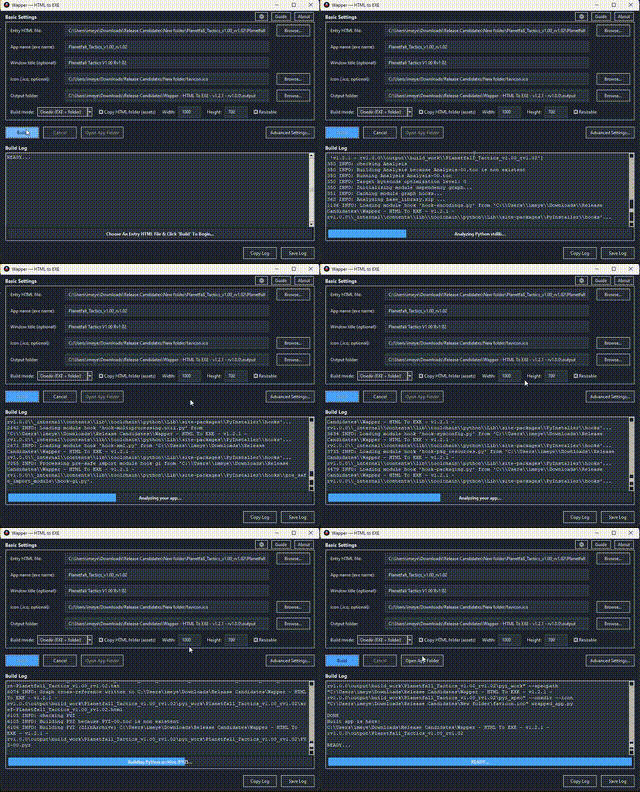
Wapper in action!
Update Released:
- Updated to v1.3.4 - rv1.1.3 - I fixed a bug with the private mode setting. Because of the way the port was randomly chosen, the saved data was not being found. I fixed it so when private mode is ON, the port is still random, but if private mode is OFF, the port is deterministic. The name of your app/game set in Wapper, prior to building the exe, will determine the port it will be on. So the same name will always use the same port. Any issues, please let me know.
Key features:
- Fast builds: often as quick as 10 seconds on a typical dev machine (project/spec dependent).
- No Python install required: you do not need Python on your PC - Wapper includes/handles the build environment.
- Any entry file name: pick whichever HTML file should launch first (not limited to the name index.html).
- No CORS errors: bypass the 'file://' headaches with the built-in local sever for seamless asset loading. Never worry about 'Cross-Origin Resource Sharing' blocking your assets, again.
- OneDir mode (Recommended): best compatibility + faster startup (ships as a folder)
- OneFile mode: single-EXE convenience (may start slower / may trigger more antivirus false positives)
- WebView2 support + verification tool: includes a WebView2 install check tool, with an option to bundle that same verifier into the app you ship.
- Add a custom splash screen to show before your app/game starts. Add your logo or company name using a static image (jpg, png). Or add an animated into using a gif or a full motion video using a mp4 file. (v1.3.0+)
- Optional Obfuscate/Archive (Advanced): packs web content into a custom archive to deter casual extraction (deterrent, not encryption/DRM).
Basic settings:
- Select HTML file.
- Set EXE name.
- Set window title
- Select icon.
- Build modes: OneFile/OneDir.
- Copy HTML folder (assets).
- Window size (height/width).
- Resizable window toggle.
Advanced settings:
Packer:
- Force clean build.
- Optimize bytecode.
- Hidden imports.
- Exclude modules.
- Extra files (EXE Directory).
- Extra files (HTML Directory).
- Product name.
- File description.
- Company name.
- Copyright info.
- Version number.
Webview:
- Start fullscreen.
- Frameless Window (kiosk look).
- Always on top.
- Start centered.
- Enable dev tools (debug).
- Disable context menu (right click).
- Confirm on close.
- Disable external navigation (open in browser).
- Backend selection (auto, webview2, MSHTML (legacy), CEF (chromium)).
- Private mode (no persistence between runs)
- Storage location (cookies/localStorage).
- Include webview2 verification tool in output.
Splash (v1.3.0+):
- Enable splash screen.
- Splash media (jpg, png, gif, mp4).
- Duration (ms).
- Transition (fade/cut).
Obfuscate:
- Enable archive.
- Extract location (appdata/portable next to exe).
- Delete extracted cache on close.
- Exclude extra files (HTML dir) from archive.
Real-world overhead (size):
Wapper adds ~<20MB of wrapper overhead to your project.
Example: a 45.8MB web game became 65.4MB after building (+19.6MB).
How Wapper compares (speed, friction, and overhead):
Vs Electron / NW.js: Electron-style apps usually ship a full browser runtime, which often means much larger output sizes (often 100MB+) and a heavier setup/workflow. Wapper focuses on a lightweight wrapper and a fast, click-to-build experience.
Vs PWA: PWAs stay browser-based and depend on web deployment + service worker caching/versioning. Wapper produces a real Windows desktop executable with no browser UI and a local-first distribution path.
Desktop capability: Wapper runs as a Windows desktop app hosting a webview with a local Python-backed wrapper/server, enabling native-style workflows when used - for example file import/export, reading/writing local files your app manages, local background tasks/endpoints, and richer offline/local behavior than a typical browser-based install.
Use cases:
- Ship a web game as a real desktop game: turn a jam build or personal project into something that launches from the taskbar like a proper app - with a custom icon and no browser UI.
- Package small tools and utilities: wrap internal dashboards, generators, trackers, or one-off helper apps into a clean Windows app you can hand to someone without explaining “open this in your browser.”
- Make your portfolio projects feel legit: present demos as desktop apps instead of “a tab next to email,” so they look and feel like real software.
- Offline-first apps and local workflows: distribute apps that run locally and can support things like file import/export, reading/writing local files your app manages, and richer offline behavior than a typical browser install.
- Kiosk / fullscreen experiences: build simple kiosk-style apps for events, displays, classroom tools, museums, or touch-friendly demos using frameless/fullscreen options.
- Quick client deliverables: give clients a single desktop app (or a simple folder build) instead of hosting, deployment, and browser/version headaches.
About the software:
Wapper exists because I got tired of the same choice every time I wanted to "convert" my web project into an exe: spend hours fighting packaging headaches, or pay a high fee to turn a web project into an .exe. I didn’t want a whole new stack or a weekend lost to error logs - I just wanted a fast, easy path from an HTML app or game to a real desktop app.
So I built Wapper to bridge the gap from the web world to the desktop. It’s for any web developer who wants their work to feel like real software - something that lives on the taskbar, launches like a proper app, and shows up with a custom icon - instead of being “just a browser tab” sitting next to your email.
Wapper is also for people who have never even considered desktop deployment because the usual routes feel like too much: learning Python or Rust, setting up complicated tooling, troubleshooting missing libraries, and digging through cryptic logs. The goal is simple: let any web dev become a desktop dev with no barrier to entry - no expert knowledge required, just an HTML project and the desire to ship it.
Wapper is made for web devs who don’t need a massive framework just to ship a small app or game - they just want a basic wrapper that works, fast, with sensible options when they want them.
Requirements:
Windows 10 / 11
WebView2 (for output app to work)
All Windows 11 systems have webview2 installed, however some (very few) Windows 10 systems may not have it installed - Wapper includes a tool to verify/install it.
Notes:
- Like many EXE builders/wrappers, antivirus false positives can happen, especially in single-file modes. Wapper defaults to safer options (OneDir, archive off) to minimize risk.
- If you are using a Wapper version before v1.3.2 - rv1.1.2, you should update to the newest version. If you do not update, please do not change the output location.
All Updates:
- Updated to v1.2.2 - rv1.0.1 - Fixed a path for the archiver that I forgot to change to work after I froze Wapper's launcher. But the archiver works again.
- Updated to v1.3.0 - rv1.1.0 - Beta - Added a new Splash tab in Advanced Settings for adding a splash screen that will show before your app/game. Supports images and video (see description above). The previous version will still be available to download as well.
- Updated to v1.3.2 - rv1.1.2 - Full and Free version - I fixed a couple of bugs. One potentially a big bug. I found that on some machines, if the user selects the wrong output location, Wapper could break and get stuck due to a long file path. I removed the Browse button to select an output location to prevent this bug from happening. You'll need to use the default output location, for now.
- Updated to v1.3.4 - rv1.1.3 - I fixed a bug with the private mode setting. The way the port was randomly chosen, the saved data was not being found. I fixed it so when private mode is ON, the port is still random, but if private mode is OFF, the port is deterministic. The name of your HTML file, prior to building the exe, will determine the port it will be on. So the same name will always use the same port.
Purchase
In order to download this tool you must purchase it at or above the minimum price of $1.87 USD. You will get access to the following files:
Download demo
Development log


Comments
Log in with itch.io to leave a comment.
Very very cool - as someone who has always wanted to make a game and can make websites, this is such a sweet tool. Works great in my testing.
Awesome! I'm glad you like it! I hope you get some good use out of it.
Comments/Feedback/Bug Reports are all welcome and appreciated! Thanks, EyeFly.